



Shop confidently with SafeKey®
An enhanced level of security when you use your Card online

Complete peace of mind when you shop online.
We want you to feel confident when you make a purchase with your American Express Card.
When will I see it?
We've joined forces with participating online merchants to offer you this improved level of online shopping protection.
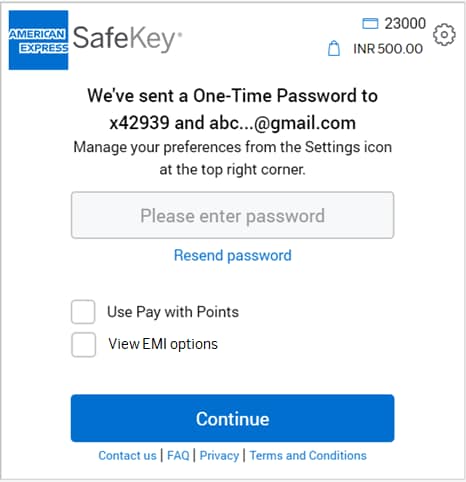
When you shop at an online merchant, the SafeKey screen will appear towards the end of your checkout process.
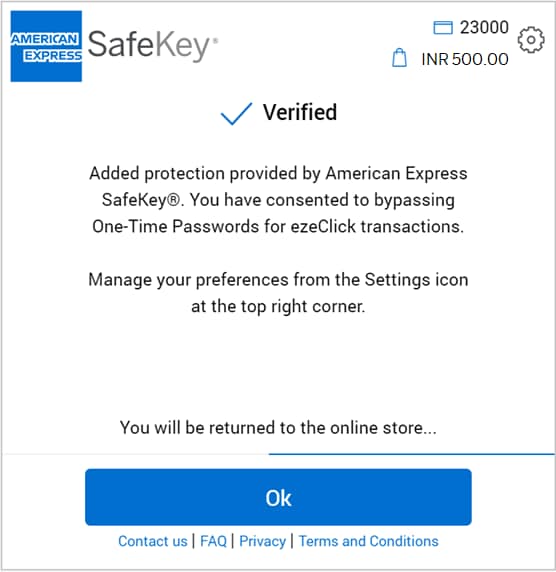

2
What do I have to do ?
SafeKey will work in the background as you make your purchase.
Once the SafeKey screen appears during an online transaction, we will instantly send you a six-digit
One Time Password (OTP) by text and/or email. Simply enter the OTP to
complete your transaction. You may select the 'Use Pay with Points' option to pay
using your Membership Rewards® points.
You are automatically registered for SafeKey, Just ensure we have up to date
contact details for you and we'll take care of the rest.
Our intelligent security systems, secure payment process and fraud protection guarantee help keep you safe and secure. Find out more.
Use points with Safekey

From flights and hotel stays, to dining and electronics,
find out how to redeem your Membership Rewards®
points with SafeKey.
Equated Monthly Installments
(EMI)

Convert your online purchases into easy-to-manage EMIs with
SafeKey.
Simply choose the EMI option when prompted and enjoy
a more convenient way to pay.
American Express SafeKey helps prevent unauthorized online use of your American Express® Card by confirming your identity with additional verification information. You may be asked to provide a dynamic One Time Password (OTP) that you receive by email or at your mobile phone number for transactions you make with participating online merchants.
Yes, American Express provides online protection for all our customers through our internet Fraud Protection & Guarantee*. American Express SafeKey is launched as part of our continuous efforts to let our customers shop in a safer and more secure online environment.
*We will guarantee protection against fraudulent transactions on your Card, provided you have taken the responsibility to notify us immediately, and you have complied with your Card Terms & Conditions.
When you enter your American Express Card number for payment at a participating online merchant, an American Express SafeKey window will appear automatically. You will be prompted to enter your OTP which will be sent to your mobile phone and/or Email address that you have on file for that account. Once your OTP is verified, your online transaction will be processed. After the OTP is sent to you, it is valid for 10 minutes. If you do not enter the OTP and complete your transaction during the 10 minutes, you will need to restart the transaction with the merchant.
You are automatically enrolled for American Express SafeKey. There is no additional step that you need to take for your existing Cards, when you get new Cards, or when you open additional new accounts other than ensuring your mobile phone number and/or Email address on file with American Express is updated for all of your American Express Cards. Please ensure your mobile phone number and/or Email address is updated with American Express for all your American Express Cards. This also includes Supplementary Cards that you hold.
No, you do not have to pay for this service. However, please check with your mobile and/or email service provider to see if charges for SMS or email apply to your mobile and/or email account.
You can proactively confirm the mobile phone number and Email address you have on file for all your American Express Cards by calling the helpline number mentioned on the back of your Card.
When you checkout with American Express SafeKey, the masked mobile phone number and Email address that we have attempted to send the OTP to are displayed. We will attempt to send the OTP to both your mobile phone and your Email address; if one is not updated you can use the other to obtain the OTP that was sent. If they are both not updated, please call the helpline number mentioned on the back of your Card.
We will use personal information collected through SafeKey for the purpose of providing the American Express SafeKey service (for example, to verify your identity or to authorize transactions). Log in to your account at www.americanexpress.co.in to view your personal details or make additional changes. Your personal information will be handled in accordance with our Online Privacy Statement.
The OTP helps to protect you against online fraud.
It is a secure way to authenticate that the customer using an American Express Card for an online purchase is the rightful owner.
Yes, you need to provide your mobile phone number or Email address to receive an OTP via SMS and/or Email. The SMS facility is only available for India mobile phone numbers. If you do not have an India mobile phone number, you can receive the OTP via Email only.
You can update your contact details by calling the helpline number mentioned on the back of your Card. Any updates you make to your contact details for your account alerts will automatically apply to SafeKey.
The OTP is valid for 10 minutes from when it was generated. If you do not enter the OTP and complete your transaction during the 10 minutes, you will need to restart the transaction with the merchant.
The OTP is valid for 10 minutes after it is generated by the transaction. If you click the “Resend Password” button within that 10 minute window, then the same OTP will be re-sent to you. If you click “Resend Password” button after the 10 minute window expires, then you will need to start the entire transaction process again which will generate a new OTP.
If the merchant is not American Express SafeKey compliant, you will not be asked for your OTP. Only American Express SafeKey merchant sites require the American Express SafeKey OTP.
Participating online merchants will display the American Express SafeKey logo on their websites.
Yes, the account numbers for each Card are different and different contact details can be added for each primary, additional, and supplementary Card you have associated with your account. All that is needed is that the correct contact details be on file for each primary, additional, and supplementary Card.
No, each Card can have a different mobile phone number or Email address associated with it. If a mobile phone number or Email address has not been put on file for the additional and supplementary Cards, please update the details on file for the Cards as needed.
No, the contact detail update for the additional or supplementary Card will not change any details on file for the primary Card or other additional/supplementary Cards. It applies to the unique Card only.
If you ever suspect that fraudulent contact information changes or purchases have been made on your American Express Card account, please contact Customer Services immediately to report it by calling the helpline number mentioned on the back of your Card.
No, you can only use Cards issued by American Express Banking Corp., India excluding Business Travel Account (BTA) and Prepaid Cards.
A transaction could fail for various reasons. If you enter the OTP incorrectly access to SafeKey may be blocked. If the OTP wasn't entered within 10 minutes, the transaction will expire. Technical issues in the merchant's payment service could also interrupt the transaction. In each of these cases, you will receive an onscreen notification letting you know what went wrong. If you have any questions, you can always call the number on the back of your Card for help.
American Express will never email you to ask you for sensitive information. If you receive a suspicious email which claims to be from American Express, do not click on any links. If you have any questions, please call the number on the back of your Card.