



Save your American Express® Card online for safe and fast checkouts.
When you save a Card with any merchant, it is saved through a unique alternate code
instead of your Card number directly. This is called “Tokenization”.
A Token enables a safe and quick payment process without sharing the actual details of your Card with a merchant.
You can save your American Express® Card when you checkout on a
merchant’s app or website.
RBI Guidelines on Saved Card Transactions
In line with the Reserve Bank of India (RBI) Guidelines to enhance safety and security of online card transactions, all card data previously stored on merchants’ websites or mobile apps was deleted by 30 September 2022.
From this date onward, to complete an online transaction you now need to manually enter your full Card number each time
you take a transaction or save your Card with the merchant.
Save your card with three steps
STEP 1
Proceed to checkout on
any merchants’
app or website.
STEP 2
Enter your Card details and choose the option to securely save the
Card as per RBI guidelines.
STEP 3
Authenticate the
request using a
One-Time Password (OTP).
Benefits of saving your Card
Enhanced Security

Seamless checkouts
without sharing your actual
Card number.
Faster Checkouts

Saved tokens allow
quicker payments on
the same merchant.
Easy Management

View, manage, or delete your saved tokens anytime through your
American Express® account.
Managing your saved tokens with American Express®
You can easily manage all the merchants where you have saved your Card in one place.
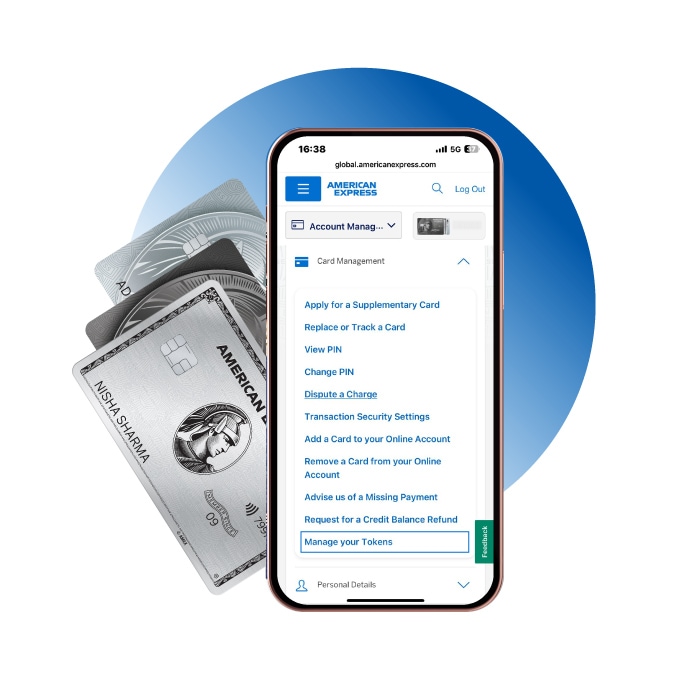
To view or manage your tokens follow these 3 steps:
- Log in to your American Express Online Account.
- Go to the Account Management tab
- Select Manage My Tokens. From here, you can view and manage all the merchants
where your Card is saved.
Frequently Asked Questions
Tokenization is the process of replacing an actual Card number with a unique number called a ‘token’. This enables the processing of payments without sharing your Card details to any entity except the bank/network. Tokens are a unique combination of your Card credentials and the token requestor or merchant, i.e., the merchant or entity that has received your request for tokenizing your Card on their App or website.
Tokenization offers additional security against fraud, as it enables the processing of online payments without exposing your actual Card details.
Effective 1 October 2022, you will not be able to see your saved Card details during checkout with online merchants.
You will need to either tokenize your Card with eligible merchants or enter your complete Card details at checkout each time you want to make an online or in-App purchase.
- Go to merchant website/ app.
- Select the item(s) and add to the cart.
- Then, go to the checkout page.
- Enter your Card details and, then click on secure Card as per RBI guidelines.
- Enter a One Time Password to authenticate.
Once your Card is tokenized successfully, it will be saved on the merchant’s website or app for future transactions.
Tokenizing your Card is optional. However, Card details can no longer be stored on any merchant website or platform. If your Card is not tokenized, according to the RBI guidelines, post 30 September 2022, you will be asked to enter the full Card number, expiry date and 4 digits security code on the Card each time you complete an online transaction.
Yes, your Card details are completely safe, as they will only be shared with the Bank/network for creating a new token with an eligible merchant.
No, each token is a unique combination of your Card credentials and the token requestor, i.e., the merchant or entity that has received your request for tokenizing your Card on their App or website. Once created, this token cannot be used with any other merchant.
Yes, a token will need to be created for each Card, whether it’s a Basic or a Supplementary Card.
Yes, because your Card details change when a replacement or renewal Card is issued, you will need to generate a new token with the merchant(s) as it’s a regulatory requirement.
While your Card details will not be stored, you will be able to see your saved token in the same way you previously saw your saved Card details on the merchant’s website or App. You can identify the token by the Bank’s name.
No, there is no limit on the number of tokens which can be created on one Card.
Tokenizing your Cards is optional. However, if you choose to tokenize more than one Card, a separate token is needed for each Card.
We are pleased to share that we will be introducing a self-servicing portal for you to manage all of your Tokens via you online account. you will be able to view all the tokens you have generated on your Card, by logging in to you online Account, and the going to Account Management Tab, you would need to Click on “Manage my Tokens”
You will also be able to perform the following maintenance on your tokens:
- Delete a token
- Suspend a token (temporarily)
- Resume a token (after Suspending the same)
Please note that Basic and Supplementary Cardmembers will need to log in and manage their tokens separately.
Yes. You can delete your token directly on the merchant’s website or App or by logging in to the online account and deleting the respective merchant token.
The merchant’s name with be displayed along with details about the specific token.
You will see your active and inactive tokens along with the following details about each token:
- Merchant name
- Status
- Updated on (Last time the Token on updated)
- Token Ending in (Last 5 digits)
- Options to manage the token such as Suspend, Delete
You will be able to perform the following maintenance on your tokens by logging in to online account:
- Delete a token
- Suspend a token (temporarily)/li>
- Resume a token (after suspending the same)
Simply click on the respective action tab and follow the steps to complete the process.
No, while our Customer Service team will be able to share details about your tokens, they will not be able to perform any maintenance request on your tokens. For maintenance, you will need to log in to your online account.
The deleted Tokens will be removed and same will not be visible after deletion.
Dear Cardmember, due to extension of data storage guidelines issued by the RBI on June 24th that online merchants can store data until Sep 30th 2022. Merchants can continue to store and use card number for transactions instead of tokens. Hence you will not face any disruptions on acceptance. While we are working with the merchant to ensure that the current Token status is reflected on merchant platform and they are working on integrating the same. The same shall take up to 2 -3 weeks’ time. Please be advised that this does not impact usage on your Card account.
Dear Cardmember, due to extension of data storage guidelines issued by the RBI on June 24th that online merchants can store data until Sep 30th, 2022. Merchants can continue to store and use card number for transactions instead of tokens. Hence you will not face any disruptions on acceptance. While we are working with the merchant to ensure that the current Token status is reflected on merchant platform, and they are working on integrating the same. The same shall take up to 2 - 3 weeks’ time. Please be advised that this does not impact usage on your Card account.
Dear Cardmember, due to extension of data storage guidelines issued by the RBI on June 24th that online merchants can store data until Sep 30th 2022. Merchants can continue to store and use card number for transactions instead of tokens. Hence you will not face any disruptions on acceptance. We are working with the merchants to ensure a token is generated when you add your Card on their platform. We anticipate the integration to complete in 2-3 weeks’ time. Please be advised that this does not impact usage on your Card account.
No, American Express does not charge a fee to Cardmembers for availing Tokenization services and benefits.