



View and Update Your Account
When you click “View/Update Account,” a table listed by Merchant Account Number will be displayed for you to view important business, bank, payment, supply, and correspondence information.
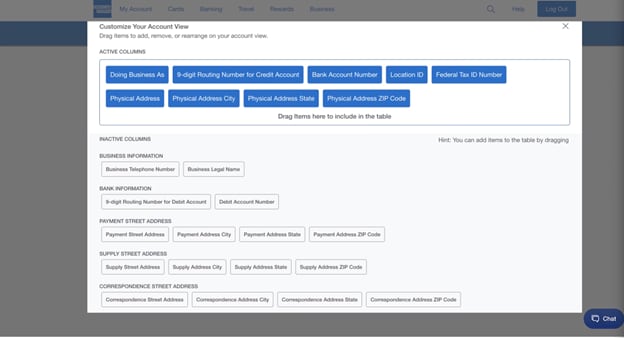
Within this tab, you have the opportunity to view or update the following information within each Merchant Account:
- DBA
- 9-digital Routing Number for Credit Account
- Bank Account Number
- Location ID
- Federal Tax ID Number
- Physical Address, City, State and Zip Code
- Business Telephone Number
- Business Legal Name
- 9-digit Routing Number for Debit Account
- Debit Account Number
- Payment Street Address, City, State and Zip Code
- Supply Street Address, City, State and Zip Code
- Correspondence Street Address, City, State and Zip Code
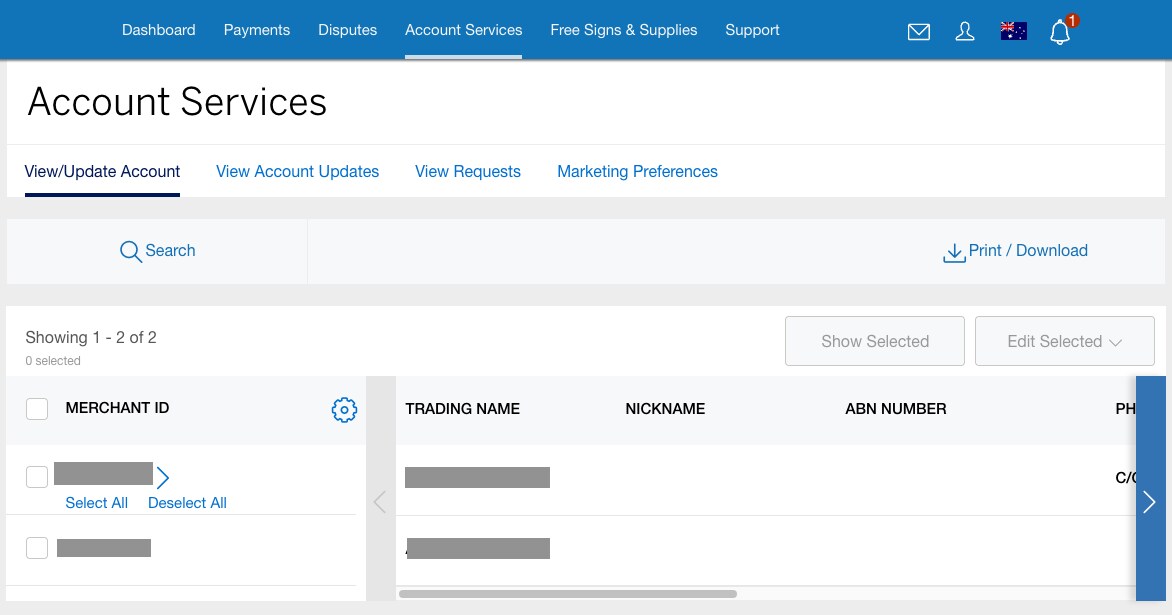
Not every Merchant Number will display in the main table by default. If a Merchant Number is a primary account and associated with multiple locations (each with their own Merchant Number), you will see the primary account number listed in the main table. When you click on the primary account number or the arrow (>) next to the account number, the table view will change to show multiple Merchant Numbers associated with the primary account. Standalone accounts can be viewed in the main table display and will not be nested within the primary account number.
By clicking on the Settings gear icon, you will be able to modify columns that display in the table by dragging and dropping them in the order you want them to appear.
Contact Us
Live Chat
Click the 'Chat' button once you login to your account to chat with a member of our service team.
Call Us
Our customer care representatives will assist you Mon-Fri, 8:00am to 6:00pm AEST/AEDT.