



PAY OVER TIME1
More time, more flexibility, more opportunities to grow your business.
Pay Over Time is a Card feature that gives you the ability to carry a balance with interest up to your Pay Over Time Limit, so you can handle expected and unexpected expenses that come your way.
Upon Card approval, the Pay Over Time setting is initially set to On, which allows you to carry a balance with interest on eligible charges. At that time, you are assigned an Annual Percentage Rate and a Pay Over Time Limit, which represents the maximum you can carry as a balance at any given time.
Purchase with confidence
Make purchases for your business knowing you have the flexibility to carry a balance with interest up to your Pay Over Time Limit. As you make purchases, eligible charges will be automatically moved to your Pay Over Time Balance up to your Pay Over Time Limit when your setting is set to On.
Pay now or later
At the end of each billing cycle, you can choose to pay your full balance, pay your minimum amount due, or pay any amount in between over time with interest, whichever is best for your business.
Earn Membership Rewards® points2
Pay Over Time allows Card Members to carry a balance over time with interest and they can continue to earn Membership Rewards® points when they pay the Minimum Payment Due by the Payment Due Date each month.
Pay Over Time is an included feature on your Card
You can manage your Pay Over Time settings on your mobile app, online account, or by calling the number on the back of your Card. Your Pay Over Time setting is initially set to On and gives you the option to pay eligible charges over time with interest, up to your Pay Over Time Limit. When the setting is set to Off, you will be required to pay all new charges in full at the next payment due date.
The Pay Over Time Limit* is how much you can carry as a balance with interest, which is not the same as how much you can spend on the Card.
You can pay your full balance each month, pay your minimum amount due, or pay any amount in between with interest, whichever is best for your business. There is no time limit to how long you can carry a balance with interest as long as you pay at least the Minimum Payment Due by the Payment Due Date each month. Any charge or portion of a charge that exceeds your Pay Over Time Limit will be due in full at the end of each billing cycle.
*You can find your Pay Over Time Limit on your mobile app, online account, or on your billing statement.
Your Card has No Preset Spending Limit, a unique feature that gives you the ability to unlock more purchase power as you use your Card. This means the spending limit is flexible. Unlike a traditional credit card with a set limit, the amount you can spend adapts based on factors such as your purchase, payment, and credit history.*
*In certain instances, a Preset Spending Limit may apply to a Card Member's account. If a Preset Spending Limit is applied, Card Members are notified.
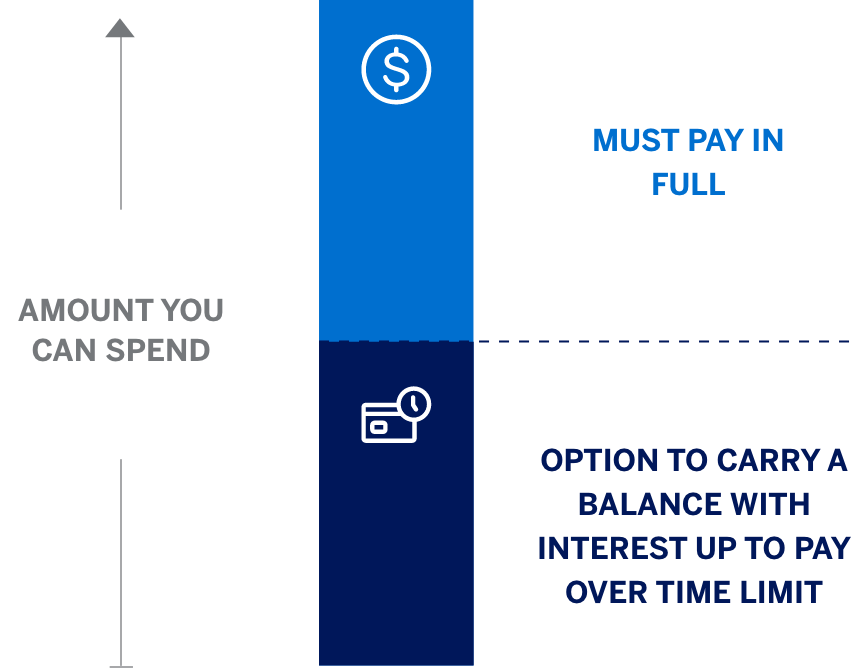
Pay Over Time is a feature that gives you the flexibility to pay for eligible charges over time, with interest. Eligible charges are automatically added to your Pay Over Time balance up to your Pay Over Time Limit when your setting is set to On.
Pay Over Time is included on most Business Platinum, Business Gold, Business Gold Rewards, Classic Business Gold, Business Green Rewards, Business Green, Executive Business, Small Business and Business Purchase Account Cards.
Ineligible charges include Cash and Express Cash, American Express® Travelers Cheques and other cash equivalents, certain insurance premiums, casino and other gambling transactions, any fees owed to American Express except foreign transaction fees, and other transactions designated by us. Any charge subject to a foreign transaction fee is not eligible to be moved to Pay Over Time on your Closing Date. You must pay in full any charge or a portion of a charge that is not added to a Pay Over Time balance.
Pay Over Time is an included feature on your Card. You are assigned an Annual Percentage Rate and a Pay Over Time Limit, which represents the maximum amount you can revolve at any given time.
As you make purchases, eligible charges will be automatically added to your Pay Over Time balance up to your Pay Over Time Limit when your setting is set to On. In addition, a charge may be eligible to automatically move to your Pay Over Time balance on your Closing Date if you have available Pay Over Time Limit on your Closing Date. Upon making a payment at the end of your billing period, you can decide to pay the statement balance in full, the Minimum Payment Due or any amount in between with interest.
If you don’t pay your account Total New Balance in full by the Payment Due Date, you will be charged interest on any unpaid portion of the Pay Over Time balance. If you’re carrying a Pay Over Time balance from your last billing period, you will be charged interest on new eligible charges starting from the transaction date. For amounts that we automatically move from your Pay in Full balance to your Pay Over Time balance on your Closing Date, we charge interest from the day after the amount is added to your Pay Over Time balance until the amounts are paid. If you pay your Account Total New Balance in full by the Payment Due Date each month, you will not be charged interest on charges that are automatically added to your Pay Over Time balance. You must pay at least the Minimum Payment Due by the Payment Due Date each month to keep your Account in good standing. The Minimum Payment Due includes all Pay In Full charges, any interest accrued on your account and a portion of your Pay Over Time balance.
If you don’t want to use Pay Over Time, you can pay your statement balance in full each month or you can turn the feature Off by managing your settings within your online account by selecting “Manage Pay Over Time” under Account Services and then Payment & Credit Options. Additionally, you can change your setting within your mobile app or by calling the number on the back of your Card.
Upon Card approval, the Pay Over Time setting on your Account is initially set to On. There are two settings, On and Off. Eligible charges will be automatically added to your Pay Over Time balance based on your Pay Over Time setting at 8:00 pm ET each day. If your Pay Over Time Setting is set to On at 8:00 pm ET, all eligible charges on that calendar day will be automatically added to your Pay Over Time balance. In addition, a charge may be eligible to automatically move to your Pay Over Time balance on your Closing Date if the charge has a transaction date when Pay Over Time was set to On and your Pay Over Time setting is set to On at 8:00 pm ET on your Closing Date. If your Pay Over Time Setting is set to Off at 8:00 pm ET, all charges on that calendar day will be automatically added to your Pay In Full balance.
Pay Over Time is very similar for eligible Personal and Small Business Cards. However, some differences may include your Pay Over Time Limit, eligibility of charges, and your Annual Percentage Rate (APR). Plan It® is currently not available for Small Business Cards.
If your Account is enrolled in a Membership Rewards program, you will continue to earn points as long as you pay the Minimum Due by the Payment Due Date. Your ability to earn points will not be impacted by how you choose to pay.
Each month, you can pay your statement balance in full without interest, the Minimum Payment Due or any amount in between with interest. You must pay in full any charge or a portion of a charge that is not added to a Pay Over Time balance.
If you would like to avoid interest charges, you can pay in full each month. If you are using AutoPay and want to avoid interest charges, set your AutoPay setting to “Statement Balance”.
Your Annual Percentage Rate (APR) is the annual interest rate assigned to your Account. You will only be charged interest on amounts added to your Pay Over Time balance. You can find your APR in the Balance Details section of your Account home page, mobile app, or billing statement. Your APR is based on your Experian Credit Score. Your Transunion Credit Score will be used if your Experian Credit Score is unavailable.
Your billing statement will show you all of your charges and payment options at a glance. It will list your Total New Balance which includes all charges, your Pay In Full portion, and your Pay Over Time portion. You will also see your Minimum Payment Due, Payment Due Date, Pay Over Time Limit, and any applicable interest charges.
Your Pay Over Time Limit is the maximum amount you can carry as a balance at any given time. Your Pay Over Time Limit may be different than the total amount you are allowed to spend on your Card. You must pay in full any charge or a portion of a charge that is not added to a Pay Over Time balance. We may increase or decrease the amount of your Pay Over Time Limit and will tell you if we change that amount. You can find your Pay Over Time Limit on your mobile app, online account, or on your billing statement.
No, your Pay Over Time Limit is not a spending limit. Your Card continues to have No Preset Spending Limit unless communicated to you otherwise.
No Preset Spending Limit means your spending limit is flexible. Unlike a traditional Card with a set limit, the amount you can spend adjusts based on factors such as your purchase, payment, and credit history.
On a monthly basis, your total Account balance is reported to the Small Business Credit Bureau and your Pay Over Time Limit is not reported. As long as your Account remains in good standing, your Account will not be reported negatively to the Small Business and Consumer Credit Bureaus.
Pay Over Time is offered by invitation only. If you do not have Pay Over Time on your Card, American Express evaluates eligibility and will notify you if Pay Over Time can be added.
1Pay Over Time Option
Eligible Charges: Eligible charges made by you or any Additional Card Member on your account can be paid over time. The following types of charges are ineligible for Pay Over Time: American Express® Travelers Cheques and other cash equivalents, certain insurance premiums, casino and other gambling transactions, any fees owed to American Express except foreign transaction fees, and other transactions designated by us. In addition, statement credits for eligible purchases, or any reversals of a statement credit, may be applied to either your Pay Over Time balance or Pay In Full balance regardless of where the eligible purchases originally posted. Any charge subject to a foreign transaction fee is not eligible to be moved to Pay Over Time on your Closing Date.
Pay Over Time Settings: Pay Over Time has two settings, On and Off. When set to On, eligible charges will be automatically placed in your Pay Over Time balance, up to your Pay Over Time Limit. When set to Off, no new charges will be included in your Pay Over Time balance. You can change this setting by visiting your online account or calling the number on the back of your Card.
Interest on your Pay Over Time balance: For charges added automatically to a Pay Over Time balance, at the time they post to your account, we charge interest beginning on the date of each charge. For charges that we automatically move from your Pay in Full balance to your Pay Over Time balance on your Closing Date, we charge interest from the day after they are added to your Pay Over Time balance. We will not charge interest on charges automatically added to your Pay Over Time balances if you pay your account Total New Balance by the Payment Due Date each month. If at the time you turn on Pay Over Time, you’re already carrying a Pay Over Time balance from your last billing period, we will charge interest on new eligible charges added to a Pay Over Time balance from the transaction date. However, for charges that we move from your Pay In Full balance to your Pay Over Time balance on your Closing Date, we will charge interest from the day after they are added to your Pay Over Time balance. You must pay in full, by the Payment Due Date, any charge or portion of a charge that is not added to a Pay Over Time balance.
Pay Over Time Limit: We assign a Pay Over Time Limit to your Account. Your Pay Over Time Limit is the maximum amount you may carry as a balance. We may increase or decrease the amount of your Pay Over Time Limit and will tell you if we change that amount. Your Pay Over Time Limit may be different than the total amount you are allowed to spend on your Card. You must pay at least the Minimum Payment Due by the Payment Due Date each month to keep your account in good standing. The Minimum Payment Due includes all Pay in Full charges, any interest accrued on your account and a portion of your Pay Over Time balance.
No Preset Spending Limit: No Preset Spending Limit means your spending limit is flexible. Unlike a traditional Card with a set limit, the amount you can spend adjusts based on factors such as your purchase, payment, and credit history.
2 Membership Rewards® Program
Terms and Conditions for the Membership Rewards® program apply. Visit membershiprewards.com/terms for more information. Participating partners and available rewards are subject to change without notice.
The value of Membership Rewards points varies according to how you choose to use them. To learn more, go to www.membershiprewards.com/pointsinfo.