



Pay Over Time1
Flexible payment options for your business
Pay for charges in full when it makes sense or pay for them over time with interest when you need help managing cash flow. You decide what payment option is best for your business.


Confidently Manage Payments
Make eligible purchases on your Card knowing your business has the option to carry a balance with interest up to your Pay Over Time Limit.

More Time, More Flexibility
At the end of each billing period, you can choose to pay your full Statement Balance, pay your Minimum Payment Due or pay any amount in between with interest, whichever is best for your business.

Keep Earning Rewards2
You can continue to earn rewards regardless of how you choose to pay, when you pay at least the Minimum Payment Due by the payment due date.
Pay Over Time is a built-in feature of your Card
Your Pay Over Time setting is initially set to On. You can manage your Pay Over Time settings on your mobile app, online account, or by calling the number on the back of your Card. When the setting is set to Off, you will be required to pay all new charges in full at the time of your next payment due date.

Minimum Payment Due
Maintain flexibility by paying
only the minimum payment
due.
Any Amount in Between
Stay in control while managing
lower payments in a way that
works for your cash flow.
Full Statement Balance
Pay your statement balance
in full.
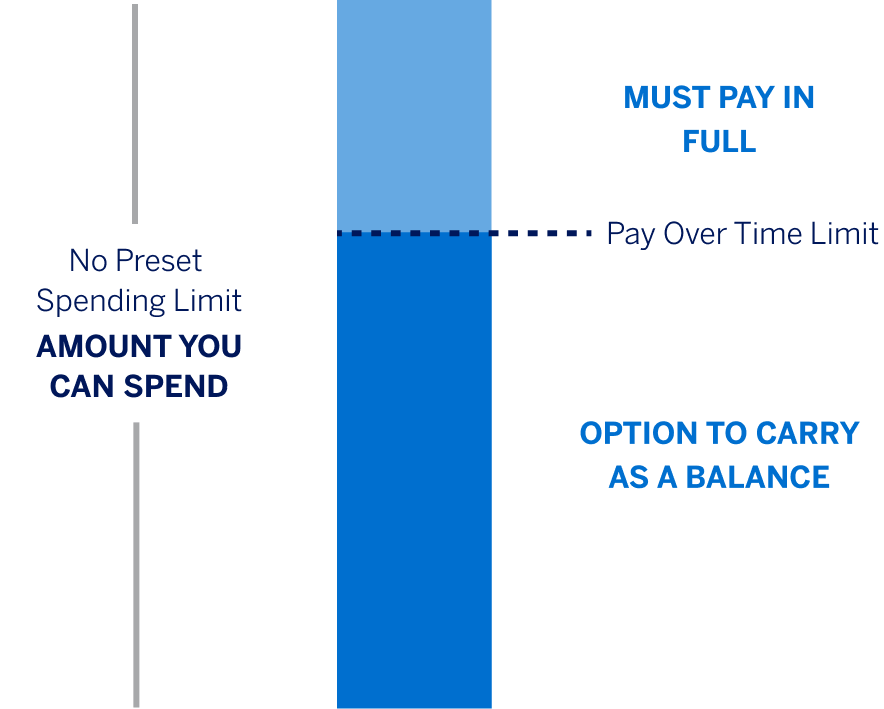
No Preset Spending Limit* is a unique feature that gives you the ability to unlock more purchase power as you use your Card. This means the spending limit is flexible. In fact, unlike a traditional credit card with a set limit, the amount you can spend adapts based on factors such as purchase, payment, and credit history.3
* In certain instances, we may assign a specific spending limit to a Card Member’s account. This can be due to a variety of factors such as credit score, past due payments with us or other creditors, or high balances on revolving credit accounts. If a Preset Spending Limit is placed on your account, we will notify you, tell you why, and explain how it impacts how much you can spend.
Pay Over Time Limit is the maximum amount you may carry as a balance with interest, which is not the same as how much you can spend on the Card. You must pay in full, by the Payment Due Date, any charge or portion of a charge that is not added to your Pay Over Time balance. Eligible charges will be automatically added to a Pay Over Time balance, up to the Pay Over Time Limit. You can find your Pay Over Time Limit on your mobile app, online account, or on your billing statement.
Pay Over Time is a feature that gives you the flexibility to pay for eligible charges over time, with interest. Eligible charges are automatically added to your Pay Over Time balance up to your Pay Over Time Limit when your setting is set to On.
Pay Over Time is included on most Business Platinum, Business Gold, Business Gold Rewards, Classic Business Gold, Business Green Rewards, Business Green, GraphiteTM Business Cash Unlimited, Executive Business, Small Business and Business Purchase Account Cards.
Ineligible charges include cash equivalents, certain insurance premiums, any fees owed to American Express except foreign transaction fees and Annual Membership Fees, and other transactions designated by us. Any charge subject to a foreign transaction fee is not eligible to be moved to Pay Over Time on your Closing Date. You must pay in full any charge or a portion of a charge that is not added to a Pay Over Time balance.
Pay Over Time is an included feature on your Card. You are assigned an Annual Percentage Rate and a Pay Over Time Limit, which represents the maximum amount you can revolve at any given time.
As you make purchases, eligible charges will be automatically added to your Pay Over Time balance up to your Pay Over Time Limit when your setting is set to On. In addition, a charge may be eligible to automatically move to your Pay Over Time balance on your Closing Date if you have available Pay Over Time Limit on your Closing Date. Upon making a payment at the end of your billing period, you can decide to pay the statement balance in full, the Minimum Payment Due, or any amount in between with interest.
If you don’t pay your account Total New Balance in full by the Payment Due Date, you will be charged interest on any unpaid portion of the Pay Over Time balance. If you’re carrying a Pay Over Time balance from your last billing period, you will be charged interest on new eligible charges starting from the transaction date. For amounts that we automatically move from your Pay in Full balance to your Pay Over Time balance on your Closing Date, we charge interest from the day after the amount is added to your Pay Over Time balance until the amounts are paid. If you pay your Account Total New Balance in full by the Payment Due Date each month, you will not be charged interest on charges that are automatically added to your Pay Over Time balance. You must pay at least the Minimum Payment Due by the Payment Due Date each month to keep your Account in good standing. The Minimum Payment Due includes all Pay In Full charges, any interest accrued on your account, and a portion of your Pay Over Time balance.
If you don’t want to use Pay Over Time, you can pay your statement balance in full each month or you can turn the feature Off by managing your settings within your online account by selecting “Manage Pay Over Time” under Account Services and then Payment & Credit Options. Additionally, you can change your setting within your mobile app or by calling the number on the back of your Card.
Upon Card approval, the Pay Over Time setting on your Account is initially set to On. There are two settings, On and Off. Eligible charges will be automatically added to your Pay Over Time balance based on your Pay Over Time setting at 8:00 pm ET each day. If your Pay Over Time Setting is set to On at 8:00 pm ET, all eligible charges on that calendar day will be automatically added to your Pay Over Time balance. In addition, a charge may be eligible to automatically move to your Pay Over Time balance on your Closing Date if the charge has a transaction date when Pay Over Time was set to On and your Pay Over Time setting is set to On at 8:00 pm ET on your Closing Date. If your Pay Over Time Setting is set to Off at 8:00 pm ET, all charges on that calendar day will be automatically added to your Pay In Full balance.
Pay Over Time is very similar for eligible Personal and Small Business Cards. However, some differences may include your Pay Over Time Limit, eligibility of charges, and your Annual Percentage Rate (APR). Plan It® is currently not available for Small Business Cards.
If your Account is enrolled in a Membership Rewards program or your Card Account earns cash back,*** you will earn rewards the same way you usually do, as long as you pay the Minimum Due by the Payment Due Date. Your ability to earn rewards will not be impacted by how you choose to pay.
***Cash back is received in the form of Reward Dollars that can be redeemed as a statement credit and at Amazon.com checkout.
Each month, you can pay your statement balance in full without interest, the Minimum Payment Due, or any amount in between with interest. You must pay in full any charge or a portion of a charge that is not added to a Pay Over Time balance.
If you would like to avoid interest charges, you can pay in full each month. If you are using AutoPay and want to avoid interest charges, set your AutoPay setting to “Statement Balance".
Your Annual Percentage Rate (APR) is the annual interest rate assigned to your Account. You will only be charged interest on amounts added to your Pay Over Time balance. You can find your APR in the Balance Details section of your Account home page, mobile app, or billing statement. Your APR is based on your Experian Credit Score. Your Transunion Credit Score will be used if your Experian Credit Score is unavailable.
Your billing statement will show you all of your charges and payment options at a glance. It will list your Total New Balance which includes all charges, your Pay In Full portion, and your Pay Over Time portion. You will also see your Minimum Payment Due, Payment Due Date, Pay Over Time Limit, and any applicable interest charges.
Your Pay Over Time Limit is the maximum amount you can carry as a balance at any given time. Your Pay Over Time Limit may be different than the total amount you are allowed to spend on your Card. You must pay in full any charge or a portion of a charge that is not added to a Pay Over Time balance. We may increase or decrease the amount of your Pay Over Time Limit and will tell you if we change that amount. You can find your Pay Over Time Limit on your mobile app, online account, or on your billing statement.
No, your Pay Over Time Limit is not a spending limit. Your Card continues to have No Preset Spending Limit unless communicated to you otherwise.
No Preset Spending Limit means your spending limit is flexible. Unlike a traditional Card with a set limit, the amount you can spend adjusts based on factors such as your purchase, payment, and credit history.
On a monthly basis, your total Account balance is reported to the Small Business Credit Bureau and your Pay Over Time Limit is not reported. As long as your Account remains in good standing, your Account will not be reported negatively to the Small Business and Consumer Credit Bureaus.
Pay Over Time is offered by invitation only. If you do not have Pay Over Time on your Card, American Express evaluates eligibility and will notify you if Pay Over Time can be added.
1. Pay Over Time
These terms will be effective through January 31, 2027.
2. Pay Over Time Option
Eligible Charges: Purchases made by you or any Additional Card Member on your account (along with any associated foreign transaction fees) and Annual Membership Fees are eligible. The following types of charges are ineligible: cash equivalents, certain insurance premiums, and any other fees owed to American Express. In addition, statement credits for eligible purchases, or any reversals of a statement credit, may be applied to either your Pay Over Time balance or Pay In Full balance regardless of where the eligible purchases originally posted.
Pay Over Time Settings: Pay Over Time has two settings, On and Off. When set to On, eligible charges will be automatically placed in your Pay Over Time balance, up to your Pay Over Time Limit. When set to Off, no new charges will be included in your Pay Over Time balance. You can change this setting by visiting your online account or calling the number on the back of your Card.
Interest on your Pay Over Time balance: For charges added automatically to a Pay Over Time balance at the time they post to your account, we charge interest beginning on the date of each charge. For charges that we automatically move from your Pay in Full balance to your Pay Over Time balance on your Closing Date, we charge interest from the day after they are added to your Pay Over Time balance. We will not charge interest on charges automatically added to your Pay Over Time balance if you pay your account Total New Balance by the Payment Due Date each month. If at the time you turn on Pay Over Time, you’re already carrying a Pay Over Time balance from your last billing period, we will charge interest on new eligible charges added to a Pay Over Time balance from the transaction date. However, for charges that we move from your Pay In Full balance to your Pay Over Time balance on your Closing Date, we will charge interest from the day after they are added to your Pay Over Time balance. You must pay in full, by the Payment Due Date, any charge or portion of a charge that is not added to a Pay Over Time balance.
Pay Over Time Limit: We assign a Pay Over Time Limit to your Account. Your Pay Over Time Limit is the maximum amount you may carry as a balance. We may increase or decrease the amount of your Pay Over Time Limit and will tell you if we change that amount. Your Pay Over Time Limit may be different than the total amount you are allowed to spend on your Card. You must pay at least the Minimum Payment Due by the Payment Due Date each month to keep your account in good standing. The Minimum Payment Due includes all Pay in Full charges, any interest accrued on your account and a portion of your Pay Over Time balance.
No Preset Spending Limit: No Preset Spending Limit means your spending limit is flexible. Unlike a traditional Card with a set limit, the amount you can spend adjusts based on factors such as your purchase, payment, and credit history.
Effective on February 1, 2027, the above terms will be replaced with the following terms:
Pay Over Time
Eligible Charges: Purchases made by you or any Additional Card Member on your account (along with any associated foreign transaction fees) and Annual Membership Fees are eligible. The following types of charges are ineligible: cash equivalents, certain insurance premiums, and any other fees owed to American Express. In addition, statement credits for eligible purchases, or any reversals of a statement credit, may be applied to either your Pay Over Time balance or Pay In Full balance regardless of where the eligible purchases originally posted.
Pay Over Time Balance: On the Transaction Date, eligible charges will be automatically added to your Pay Over Time balance on the transaction date provided by the merchant, or on the date when an eligible Annual Membership Fee is charged to your account, subject to your Pay Over Time Limit. If the addition of an entire charge to your Pay Over Time balance would cause your Pay Over Time balance to exceed your Pay Over Time Limit, that charge will be added to your Pay In Full balance. The transaction date provided by the merchant may differ from the date you made the purchase if, for example, there is a delay in the merchant submitting the transaction to us or if the merchant uses the shipping date as the transaction date. Charges with the same transaction date will be added to your Pay Over Time balance in any order we choose.
On the Closing Date, if 1) your Pay Over Time balance is less than your Pay Over Time Limit, and 2) there are eligible new charges in your Pay In Full balance, you authorize us to automatically move all or a portion of those charges to your Pay Over Time balance, subject to your Pay Over Time Limit. If the addition of a charge to your Pay Over Time balance would cause your Pay Over Time balance to exceed your Pay Over Time Limit, we will move a portion of that charge to your Pay Over Time balance, up to your Pay Over Time Limit. The remaining portion of the charge will remain in your Pay In Full balance. Eligible charges will be moved to your Pay Over Time balance in order of the transaction dates. Charges with the same transaction date will be added to your Pay Over Time balance in any order we choose. A new charge, or a portion of a new charge, will not be eligible to be moved to your Pay Over Time balance on your Closing Date if:
- that charge is subject to a Foreign Transaction Fee;
- that charge or a portion of that charge is disputed (for a reason other than fraud) and that dispute is not resolved in the same billing period in which it was opened;
- that charge or a portion of that charge is reported as fraudulent and either (i) we determined the charge is fraudulent in the same billing period in which it was posted to your Account, or (ii) we have not yet determined if the charge is fraudulent in the same billing period in which it was posted to your Account;
- your Account is cancelled or enrolled in a payment program.
Pay Over Time Limit: We assign a Pay Over Time Limit to your Account. Your Pay Over Time Limit is the maximum amount you may carry as a balance. Your Pay Over Time balance cannot exceed your Pay Over Time Limit. If the addition of a charge would cause your Pay Over Time balance to exceed your Pay Over Time Limit, that charge will be added to your Pay In Full balance. We may increase or decrease the amount of your Pay Over Time Limit and will tell you if we change that amount. Your Pay Over Time Limit may be different than the total amount you are allowed to spend on your Card. We may approve or decline a charge regardless of whether your Card Account balance is greater or less than your Pay Over Time Limit. You must pay at least the Minimum Payment Due by the Payment Due Date each month to keep your account in good standing. The Minimum Payment Due includes all Pay in Full charges, any interest accrued on your account and a portion of your Pay Over Time balance.
Interest on Your Pay Over Time Balance(s): For charges added automatically to a Pay Over Time balance at the time they post to your account, we charge interest from the transaction date. For charges that we automatically move from your Pay in Full balance to your Pay Over Time balance on your Closing Date, we charge interest from the day after they are added to your Pay Over Time balance. We will not charge interest on charges automatically added to your Pay Over Time balance if you pay your account Total New Balance by the Payment Due Date each month. You must pay in full, by the Payment Due Date, any charge or portion of a charge that is not added to a Pay Over Time balance.
3. Membership Rewards® Program
Terms and Conditions for the Membership Rewards® program apply. Visit membershiprewards.com/terms for more information. Participating partners and available rewards are subject to change without notice.
The value of Membership Rewards points varies according to how you choose to use them. To learn more, go to www.membershiprewards.com/pointsinfo.
4. No Preset Spending Limit
No Preset Spending Limit means the spending limit is flexible. Unlike a traditional card with a set limit, the amount you can spend adapts based on factors such as your purchase, payment, and credit history.