



Introducing the new Statements Hub
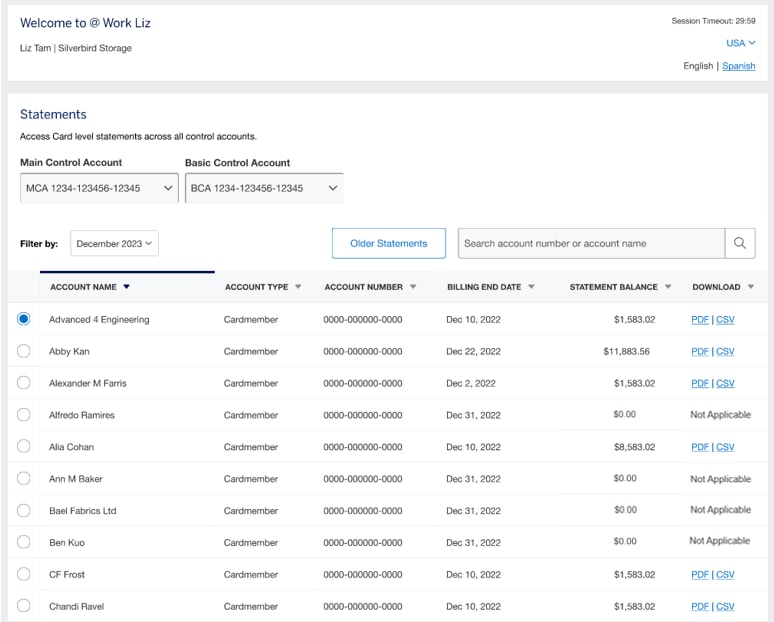
The new Statements Hub in the @ Work® platform provides a streamlined, modern user interface for faster access to your Corporate Program statements. This self-serve capability is designed for you to quickly locate, view, and download statements for your Corporate Program.
The key benefits include:
- One place to go for streamlined access to all your statements for Card Members across Corporate account types
- A fully self-serve capability
- Time savings with a fast and intuitive workflow
- An enhanced, modern user experience designed for simplicity
Program Administrators can:
- Access Card account statements across control accounts
- Search by partial account numbers or names
- Download statements in PDF and/or XLS formats
- Access statements older than 12 months
Frequently Asked Questions
To access statements from the past 12 months, use the “Filter by” drop down to select a previous month and year.
You can select up to 20 Basic or Intermediate Control Accounts to load statements for at a time.
Statements will always be available in PDF format and are typically also available to download in XLS or CSV file depending on the Program type.
If you expect to see statements but none are appearing, make sure the “Filter By” dropdown reflects the most recent month or the month you’re looking to find statements for.
Frequently Asked Questions
Once you’ve selected a Card Member, click the Older Statements button above the table. Then you can select the month and year of the statement you’re looking to download. If the statement is readily available you will see a “Download Statement” button to click. If the statement is archived, you will see a “Request Statement” button instead.
Once you’ve requested a statement older than 12 months, you can find it in the “Older Statements” module after 24-48 hours, in the “Request Statements” portion on the lower half of the page.
Once the older statement is generated (24-48 hours after requesting) it will be available for download for 15 days.
Frequently Asked Questions
Once you’ve selected the Control Accounts you’re looking to access Card Member statements for, you can use the search functionality to enter a partial or full account name or numbers to find the statement you’re looking to download.