



Send money, split purchases & focus on the moments that matter
– with Send & Split®


Backed by American Express, you can seamlessly send
money to friends for everyday expenses or easily split
shared purchases.

With Send you can:
- Repay a friend for a weekend trip, even if they don’t have an American Express® Card.
- Pay back your share of a group dinner right from the American Express® App, or within Venmo or PayPal.

How to quickly send money in the Amex® App
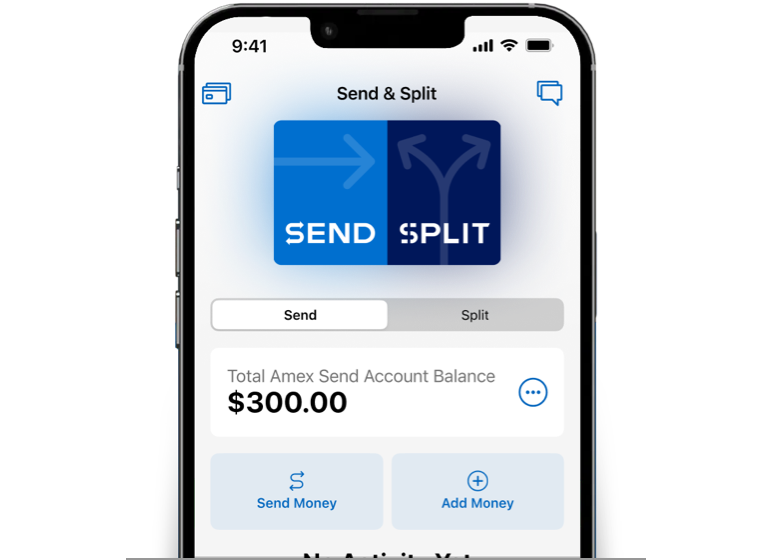
Go to your Amex Send® Account
Open the Amex® App, go to the Account tab, tap Send & Split, and then tap Send Money.
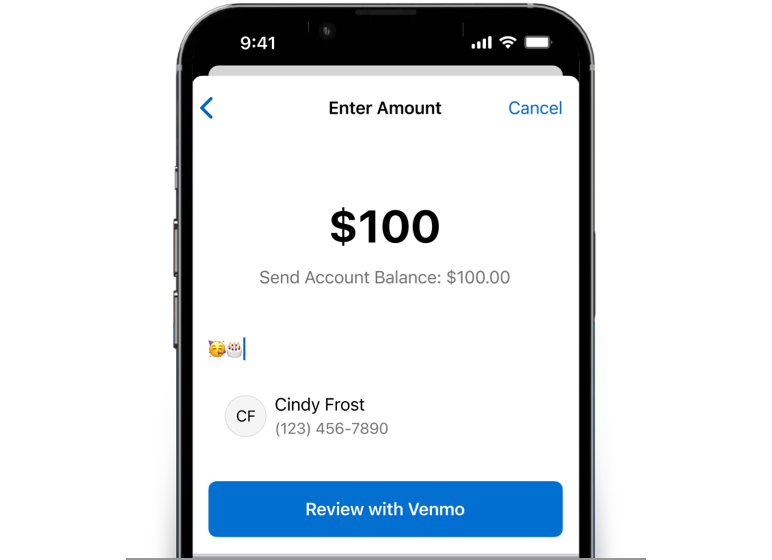
Enter the payment details
Select a Venmo or PayPal user (they don’t need an Amex Card) and enter the amount to send. If you don’t have enough money in your Send Account balance, instantly add money from your Amex Card.
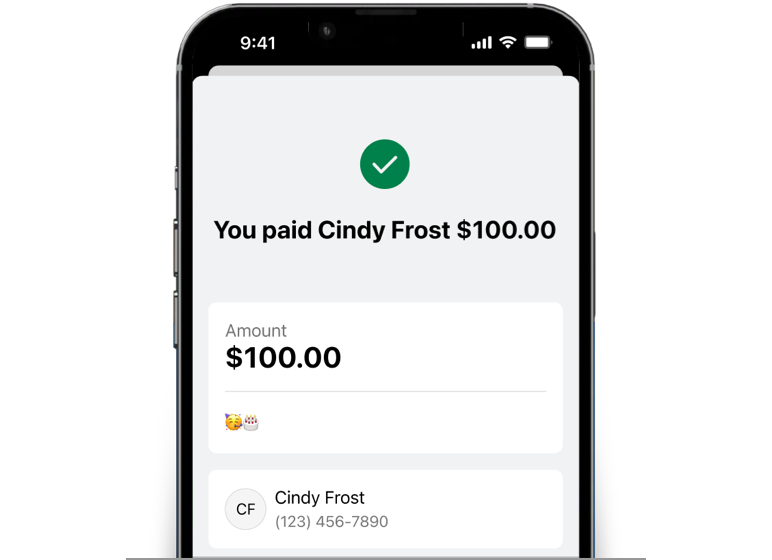
Complete the payment
Confirm the payment, and your friend will receive the money in their Venmo or PayPal account right away.

Or send money in the Venmo or PayPal app
Select Amex Send Account as your payment method within your Venmo or PayPal account. If you don't
have enough money in your Send Account, you'll be prompted to add money from your Amex Card.
With Split you can:
- Settle the brunch bill with other Venmo or PayPal users and get paid back directly to your Amex Card as a statement credit.
- Divide a group gift and we’ll do the math, send out the requests, and keep track of who’s paid you back.
- Share grocery expenses and keep all the rewards you earned on that purchase.

How to quickly split a purchase with the Amex® App
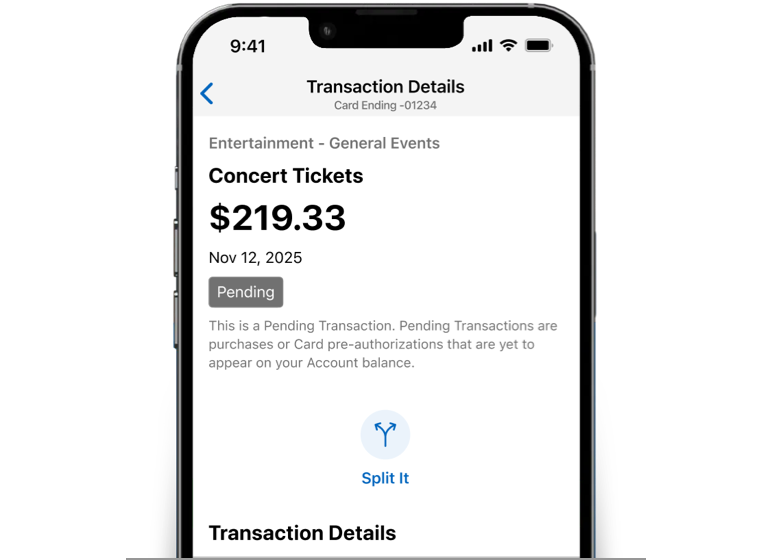
Select a purchase to split
Open the Amex® App, select pending or posted purchases, tap Split It, then select Venmo or PayPal users to split with.
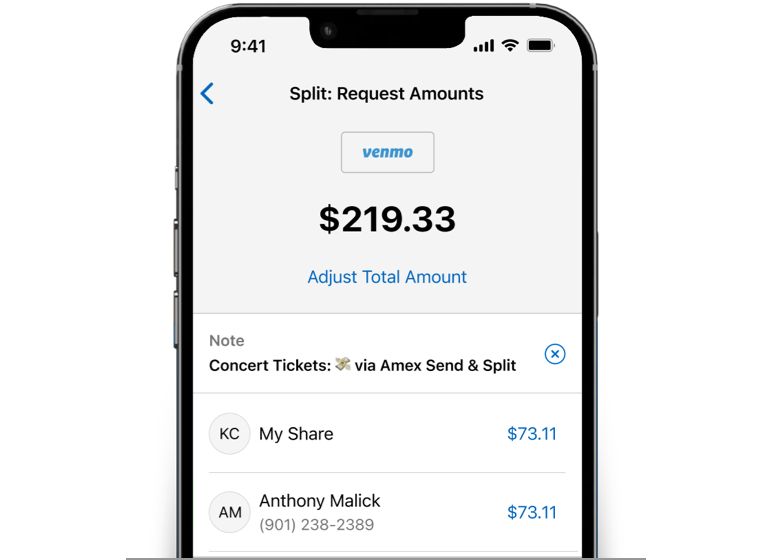
We’ll do the math
We’ll divide up the purchase evenly, but you can always change each friend’s share and we’ll automatically adjust the rest.
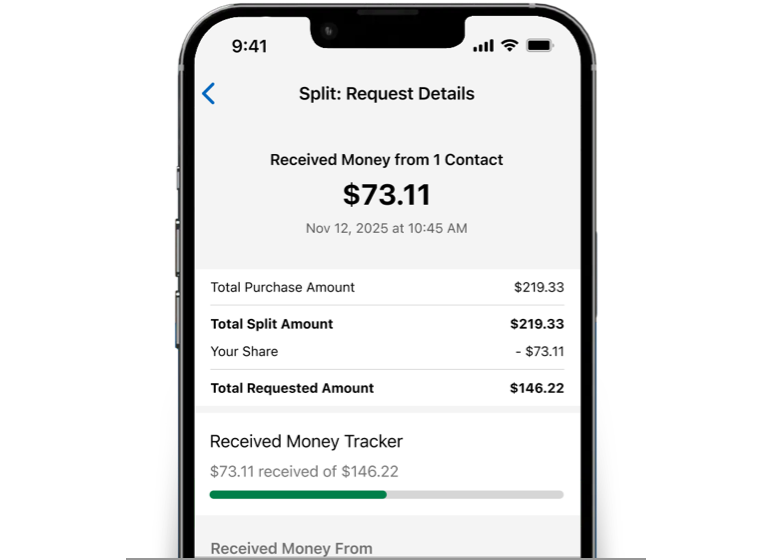
Get paid back and keep track
When your friend accepts the payment request, we’ll instantly apply a statement credit to your Amex Card, or you can get paid back directly to your linked Venmo or PayPal account. You can track your requests and who’s paid you back – all in the Amex® App.
It’s easy to get started

Log in to the Amex® App and tap the Account tab.

Select Send & Split under Payment Tools and enroll.

Then link your Venmo or PayPal account.
Frequently Asked Questions
1. About Send & Split
Send & Split allows you to send money to and split purchases with friends and family who have Venmo or PayPal accounts right from the American Express® App. To use Send & Split, you must first enroll in the Amex® App and then link your Venmo and/or PayPal account. Once linked, you have access to two distinct features:
- An Amex Send® Account to send money to any other Venmo or PayPal user (Send).
- The ability to split your American Express® Card purchases with any other Venmo or PayPal user(s) and get paid back directly to your Card as a statement credit or get paid back to your Venmo or PayPal account (Split).
Send & Split is available in the Amex® App if you have a U.S. Basic Consumer Card in your American Express digital account. Once you’ve enrolled, you can also use your Additional Consumer Cards with Send & Split. Prepaid Cards, American Express® Corporate Cards, American Express® Small Business Cards, and American Express-branded cards or account numbers issued by other financial institutions are not eligible to be used with Send & Split.
To enroll, log in to the Amex® App, go to the Account tab, and tap on “Set up Send & Split: Venmo and PayPal.” Review the “How It Works” content and then tap “Agree and Enroll.” Once enrolled, you will be prompted to link to your Venmo or PayPal account. If you don’t have a Venmo or PayPal account, you can create one.
We do not share your Card account number with Venmo or PayPal when you link your American Express Card, send money, or split a purchase.
You can send money to and split purchases with any Venmo or PayPal user(s); they do not have to be American Express Card Members.
2. Using Send
The Amex Send Account is a stored balance (prepaid) account that is opened using the profile information from your eligible Card. There are no credit checks or credit impacts to open this account. This account allows you to send money to any other Venmo or PayPal user. You’ll need to add money to the Send Account from your American Express Card before you can send money. When you add money to your Send Account, it will appear as a charge on your American Express Card billing statement. The use of the Amex Send Account is subject to the terms of the Amex Send Account Terms & Conditions.
To send money in the Amex® App, please follow these steps:
1. Tap the “List of Accounts” button on the top-left of the Home tab, then select “Send & Split.” You can also swipe through your accounts on the Home tab to access Send & Split.
2. While on the Send tab, tap “Send Money.”
3. Choose the contact you want to send the money to (you can select from your device contacts or enter one manually).
4. Enter the amount of money you want to send, tap to review, and complete the transaction with your Venmo or PayPal account. If you do not have a sufficient balance in your Amex Send Account, you will be prompted to add money to your Send Account from one of your American Express Cards within the Amex® App. Please know that you can also add money by tapping on “Add Money” within the Send tab.
The recipient should receive the money in their Venmo or PayPal account right away, just as they do when you send money directly from Venmo or PayPal today.
To send money from Venmo or PayPal, please follow these steps:
1. First, in the Amex® App, make sure that you've added money to your Amex Send Account and confirm that your balance is equal to or greater than the amount you wish to send. To check your balance, tap the “List of Accounts” button on the top-left of the Home tab, then select “Send & Split.” If needed, you can add money to your Send Account by tapping “Add Money.”
2. Open Venmo or PayPal (wherever you want to send from).
3. Proceed to send money as usual (select a recipient, enter amount, and add a note).
4. Before completing the payment, change your payment method to the Amex Send Account – you can do this by tapping on the payment method icon and selecting “Amex Send Account” from the list of payment options. Then, complete the payment.
In Venmo, the Amex Send Account can only be selected as a payment method if you are making a payment for an amount that is greater than the amount in your Venmo balance. If you make a payment for an amount that is equal to or less than the amount in your Venmo balance, it will be fully funded by your Venmo balance. If you would like to use your Amex Send Account for a payment that is equal to or less than the amount in your Venmo balance, you can still do so directly in the Amex® App.
No, there is no fee to add money to your Amex Send Account. When you add money to your Send Account, it will appear as a charge on your American Express Card billing statement. The charge is subject to the APR for purchases, just like other purchases on your Card account based on the terms of your Card Member Agreement. This is not a cash advance. The charge to your Card does not earn any rewards.
American Express and Venmo do not charge a fee to send money using your Send Account. PayPal will only charge a fee if you send money to a non-US recipient.
No. The Amex Send Account should not be used to pay for goods and services, and making such payments is a violation of the Amex Send Account Terms and Conditions. You should only send money to friends and family that you know and trust.
Yes. The amount you can add from each Card will appear below the Card as Available to Add when you go to add money to the Send Account. This amount is determined by your Card’s rolling 30-day Person-to-Person transaction limit found in your Card Member Agreement. The amount you can add is also subject to our approval. The limits for each Card are as follows:
- Centurion®: $5,000
- The Platinum Card®: $4,000
- All other eligible Consumer Cards: $2,000
Yes. You can send up to $10,000 per transaction. Your Send transaction will also be subject to a rolling 30-day Send transaction limit (this is separate and distinct from your rolling 30-day Person-to-Person transaction limit for each Card, which only applies when you add money to the Send Account). Please know that PayPal and Venmo also limit the amount you can send. To learn more, visit Venmo’s or PayPal’s Help Center.
If you send money to a phone number or email address that is associated with a Venmo or PayPal account (the Send transaction appears in the “Completed” section within the Send tab of the Amex® App), the money is made available to the recipient right away and you will not be able to cancel the transaction. Please see Venmo’s or PayPal’s Help Center for more information and contact Venmo or PayPal immediately to ask for assistance. As a reminder, you should only send to friends and family that you know and trust.
If you send money to a phone number or email address that is not associated with a Venmo or PayPal account (the Send transaction appears in the “Incomplete” section within the Send tab of the Amex® App), you can cancel the transaction via the Venmo or PayPal app before the contact creates an account to receive the money.
Yes, if your Card has the Plan It feature, your Add Money transactions over $100 can be placed into a Plan, subject to the Plan It Terms.
Yes, to transfer money from your Amex Send Account back to your Card, go to Send & Split. Within the Send tab, tap the “More Options” button, then select “Transfer to Card.” Then enter the amount, select the Card, and tap “Transfer.”
A credit for the amount you transferred will post to your Card account within 24–36 hours (you’ll see it in the Home tab in the Amex® App). The description of the credit on your statement will be Amex Send: Transfer Money. You can also view your Transfer to Card transactions by tapping the “More Options” button and selecting “Statements and Transfer Activity” within the Send tab. Please know that the credit cannot be used to pay your minimum payment due for your Card.
After you add money to your Send Account from your American Express Card, you will see a pending charge on your Card just like any other purchase and the charge will post to your Card within 24–36 hours. The description of the charge will be Amex Send: Add Money.
After you send money from your Send Account, you will see the transactions within the Send tab. You will also see the transactions in your Venmo or PayPal account.
You can also view your Transfer to Card transactions and monthly statement by tapping the “More Options” button and selecting “Statements and Transfer Activity” within the Send tab.
3. Using Split
You can track your split purchases, outstanding requests, and any money you received within the Split tab of Send & Split.
1. To split a purchase, tap on any pending or posted Card purchase that appears within your current or most recent billing cycle (within the Home tab of the Amex® App), and tap “Split It.”
2. Add up to 20 additional pending or posted charges to the split request.
3. Select up to 20 contacts who you want to split the amount with (you can choose contacts from your device or enter them manually).
4. We’ll divide the total purchase amount evenly between you and the contacts you select. You can then adjust the total split amount or customize any of the individual request amounts.
5. Choose to get paid back directly to your Card account as a statement credit or to your linked Venmo or PayPal account (you cannot get paid back to your Amex Send Account).
6. Your linked Venmo or PayPal account will open to complete the split request and you’ll then be re-directed back to the Amex® App. The contacts you chose to split with will get a request notification via Venmo or PayPal just as they would today for other Venmo or PayPal requests.
7. If you choose to get paid back to your Card account, we will notify you when a request is accepted, update the status to “Received” in the Amex® App, and apply a statement credit to your Card account that will post within 24–36 hours. If you chose to get paid back to your linked Venmo or PayPal account, they will notify you when you are paid back.
You are still responsible for the full purchase amount charged to your Card and will keep any rewards that you earn for the purchase that you split.
You can track your split purchases, outstanding requests, and any money you received within the Split tab of Send & Split.
You can track all of your split purchases, outstanding requests, canceled requests, declined requests, and any money you received (accepted requests), within the Split tab of Send & Split. If you chose to get paid back to your Card account, we will notify you when a request is accepted, update the status to “Received,” and apply a statement credit to your Card account that will post within 24–36 hours.
The statement credit on your Card account will have a description of Split and include the name and/or email address or phone number of the contact that paid you back.
If you choose to receive the money to your linked Venmo or PayPal account, they will notify you when you get paid back. You can cancel any split request in Venmo or PayPal before the contact responds to the request.
No, there is no fee to split a purchase. You are still responsible for the full purchase amount that you split and any interest or fees we assess on that purchase based on the terms of your Card Member Agreement.
Yes, you’ll earn rewards for purchases that you split in the same way that you would for other purchases that you make with your Card. Please see your Card Member Agreement or Membership Rewards® program Terms and Conditions for more details about your Card’s reward program.
You’re still responsible for the full purchase amount whether a request is accepted or declined, and whether you choose to get paid back to your Card or your linked Venmo or PayPal account. American Express is not responsible for ensuring that requests are accepted, and money is paid back.
*Terms & Conditions
Send & Split® is only available in the American Express® App (“Amex App”) to Card Members with an eligible Card. Eligible Cards are US-issued Basic Consumer Cards that are issued by American Express National Bank and are not cancelled. Prepaid Cards, American Express Corporate Cards, American Express Small Business Cards, American Express-branded cards or account numbers issued by other financial institutions and American Express Cards issued outside of the United States are not eligible Cards. To use Send & Split, you must first have an email address on file, enroll in Send & Split in your American Express Online Account (“Online Account”) and open an Amex Send® stored balance account in the Amex App (“Send Account”). Send & Split allows you to: (i) send a person-to-person payment from your Send Account to Venmo and PayPal users (“Send”) and (ii) split a Card purchase (“Split”) and receive funds to your Card account as a statement credit or to your linked Venmo or PayPal account. You may use Send & Split with an Additional consumer Card that is issued in the US by American Express National Bank and is not cancelled if you also have an eligible Card in the same Online Account and that Online Account is enrolled in Send & Split. You must have or create an account with Venmo or PayPal and link your Online Account to your PayPal or Venmo account to use Send & Split. You must add money to your Send Account from your eligible Card(s) to Send to a Venmo or PayPal recipient. The money you add will be reflected in your Send Account balance. The charge on your Card for an Add Money transaction does not earn rewards and is subject to the APR for purchases on your Card. Once the Send from your Send Account is available in the recipient’s Venmo or PayPal account, you do not have the ability to cancel the transaction. There is no fee to Send to US recipients. PayPal charges a fee to Send to non-US recipients. With Split, you can split pending or posted purchases that are made with your eligible Card in your Amex App. Once you select a purchase to Split, select the contacts you want to request to Split with. You can choose to get paid back as a statement credit to your Card account (a Split credit) or to your linked Venmo or PayPal account. Split credits to your Card account apply when we receive confirmation that the Split request was completed but may take 24-36 hours to post to your Card account. You are still responsible to pay the full purchase amount charged to your Card, regardless of whether you are paid back via Split. You earn rewards for purchases that you split in the same way that you earn rewards for other purchases. Other eligibility and restrictions apply. For complete details visit americanexpress.com/sendandsplitterms to view Terms & Conditions. Send accounts offered by American Express National Bank, Member FDIC.
The American Express® App and app features are available only for eligible accounts in the United States. American Express® prepaid Cards and Cards issued by non-American Express issuers are not eligible. To log in, customers must have an American Express user ID and password or create one in the app.