



 High Yield Savings
 CDs
CDs Support
Link Your External Bank Account
Follow these steps to link your American Express® Savings account to your external bank account.
 STEP 1: Select Manage Bank Accounts
To link an external bank account once your Savings
account is active:
- Log in to your Savings account at go.amex/savingsaccount.
- On your Savings dashboard, select Manage Banks under the Useful Links section.
- You’ll see a list of your currently linked external bank accounts. Select Add Bank Account to begin linking a new external account.
Please note, if you already have an eligible linked external bank account to pay your American Express® Card, you can link it to your Savings account seamlessly by selecting the external bank account and clicking Add Bank Account.

STEP 2: Select Method of Linking
On the next screen, you may select "Log in to your external bank account" to add your account using your user ame and password or "Add bank account manually" using your account and routing numbers.

 STEP 3a: Log in to your external bank account
- On the next screen, click Agree to proceed.
- Search for your bank or select it from the list of options.
- Click Continue and log in using your bank's user name and password.
- Follow the instructions on the next screens from the external bank to complete the process. Additional verification may be required.
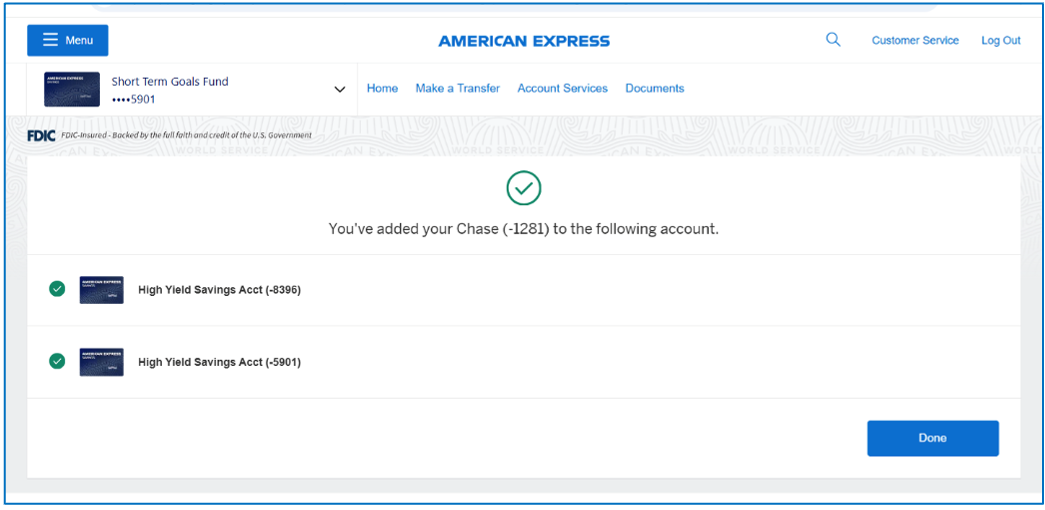
- If your request has been successful, you'll be taken to a confirmation page. Your external bank account has been successfully linked and is now ready to transfer funds.
STEP 3b: Add bank account manually
- On the next screen, provide your external Bank Account Type, Routing Number, and Account number, then select the Continue button to proceed.
- Confirm that the account information on the screen is accurate and click Submit.
- Once the request is processed, you’ll see one of the below messages.
- Your bank has been linked. If the linkage was successful, you’ll be taken to a confirmation page. Your external bank account has been successfully linked and is now ready to transfer funds.
- Verification started. Occasionally, we require additional security steps to verify the account that was added. To complete verification of your external bank account, continue to Step 3. You’ll need to verify the deposit amounts within 28 days.


STEP 4: Locate Your Test Deposits
If you received a Verification Started message after submitting your external bank account information, you’ll need to verify your account. To initiate the verification process, we’ll send two test deposits to the external account you are attempting to link. Test deposits are not immediate but should be available within one business day after initiating the account linkage.
To Locate your test deposits, log in to the external checking or savings account. The two test deposits will be labeled ACCTVERIFY, and each individual amount will be less than $1.00.
Write down the exact dollar amount of each test deposit before continuing.
TEST Deposit 1: $0.______
TEST Deposit 2: $0.______

STEP 5: VerifyYour Test Deposits
Now, you must verify the test deposits through your Savings dashboard to complete the
account linkage:
- Log in to your Savings account at go.amex/savingsaccount
- Select Manage Banks under the Useful Links section to view all pending and currently linked external bank accounts.
- Locate the external bank account that isn’t verified and click Verify Account. Please note, if your account is already verified, this selection won’t be available.
- Enter the two test deposit amounts that you obtained from your external bank and click Submit (Tip: only input the numeric value of the test deposit after the decimal, do not input $ or decimal point in the box).

You're All Set!
You can now make electronic deposits and withdrawals at your convenience.
If you initiated your account linkage in your application process, the initial deposit amount you entered on your application is automatically transferred from your external account to your Savings account.
If you initiated your account linkage after your account was active, you are now able to transfer funds between your Savings account and your external bank account by clicking on the Make a Transfer button.
Link An External Account

Accounts offered by American
Express National Bank. Member FDIC. Each depositor is insured to at least $250,000 per depositor, per insured bank, per ownership category.
* The Annual Percentage Yield (APY) as advertised is accurate as of . Interest rate and APY are subject to change at any time without notice before and after a High Yield Savings Account is opened. Interest Rate and APY of a Certificate of Deposit account is fixed once the account is funded. [There is no minimum balance required to open your Account, to avoid being charged a fee, or to obtain the Annual Percentage Yield (APY) disclosed to you]
** The national rate referenced is from the FDIC's published Monthly Rate Cap Information for Savings deposit products. Visit the FDIC website for details.
1 There is no minimum balance required to open your Account, to avoid being charged a fee, or obtain the Annual Percentage Yield (APY) disclosed to you.
2 The interest rate and Annual Percentage Yield (APY) will be disclosed in your account-opening documents, which you will receive after funding your Account. The interest rate and APY for your CD will be fixed and will either be (i) the rate reflected at application submission or (ii) the rate being offered when your CD is funded, whichever is higher. All CDs must be funded within 60 calendar days from the time we approve your application or will be subject to closure. After the CD is opened, additional deposits are not permitted. Early CD withdrawals may be subject to significant penalties which could cause you to lose some of your principal. Please see the Consumer Deposit Account Agreement and Savings Schedules for additional information.
3 For purposes of transferring funds to or from an external bank, business days are Monday through Friday, excluding holidays. Transfers can be initiated 24/7 via the website or phone, but any transfers initiated after 7:00 PM Eastern Time or on non-business days will begin processing on the next business day. Funds deposited into your account may be subject to holds. See the Funds Availability section of your Consumer Deposit Account Agreement and Savings Schedules for more information.
4 Calculations are estimates of expected interest earned. Actual results may vary, based on various factors such as leap years, timing of deposits, rounding, and variation in interest rates. The first recurring deposit is assumed to begin in the second period after any initial deposit.