



Introducing your new Insights Hub - Data where and when you need it
Access Card Program information from one comprehensive interactive Hub. With a clear up-to-date view of spending, Cards and delinquency details, your Insights Hub brings you powerful insights, analysis, and actions for more productive programme management.
Now available in the United States and GDC.
New to Insights Hub1,2: Monitor Spending3
The new Monitor Spending tool4,5,6 gives you visibility into your Cardmembers7 spending. You can choose from a curated list of spending categories8,9 to help you monitor your Cardmembers compliance10 with your company’s T&E policy. Based on your selections, this tool provides summary overviews and detailed information of highlighted spending to monitor at the account and
transaction level.
For more Monitor Spending details, including FAQs and Terms & Conditions, Click here.
Key Benefits:
Advanced algorithms can help you monitor spending categories, including:
- Spending patterns over time
- Repetitive Refunding
- Digital Subscriptions
- Spend Concentration
- Merchants Luxury and Lifestyle Spending
- Adult Entertainment
- Clubs
- Jewellery Purchases
- Use of Digital Wallets
- High Value Transactions
- And more…

You Can Now:
- Select from preset spending categories or customize from a curated list of spending categories to define the specific types of spending you want to monitor.
- Use the interactive tool and advanced filters to look at details of highlighted spending.
- Access account and transaction-level spending information.
- Label transactions to continue monitoring.
- Email11 Cardmembers to get more information on transactions.
- And more…
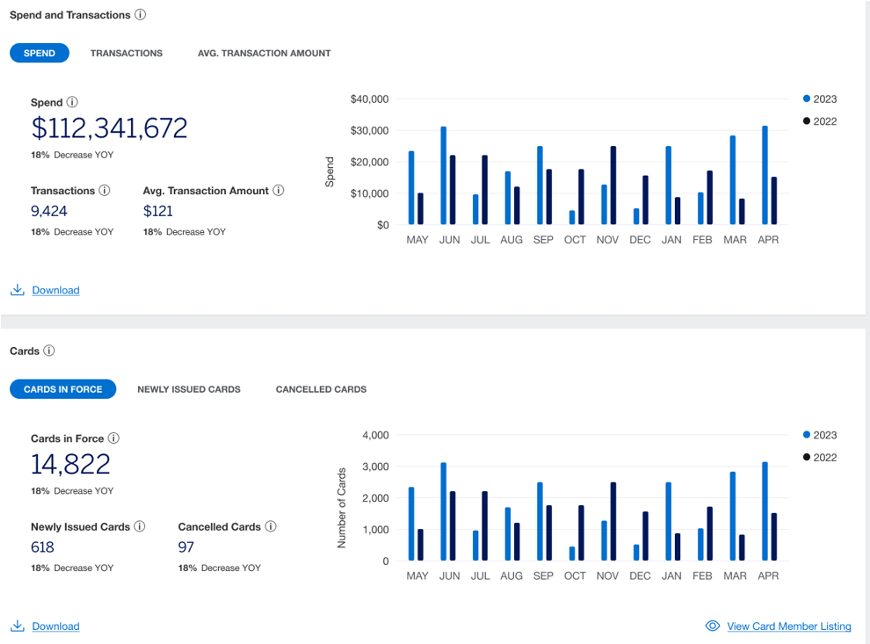
Spend and Cards-in-force Dashboard
Program Administrators can now:
- View trends of spending, transactions, Cards-in-force, newly issued and cancelled Cards and compare against previous periods.
- Analyze your spends across top Card regions and markets, Card product types, and merchant categories to understand what's driving your spending.
- View and download Cardmember lists for Cards-in-force, newly issued and cancelled Cards, and Zero Spenders.
- Manage Zero Spenders to optimize your Card program.
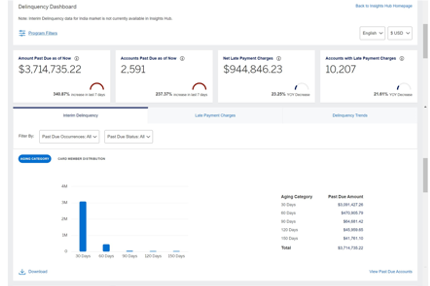
Delinquency Dashboard
Program Administrators can now:
- View breakup of outstanding balances and delinquent Card accounts by ageing categories.
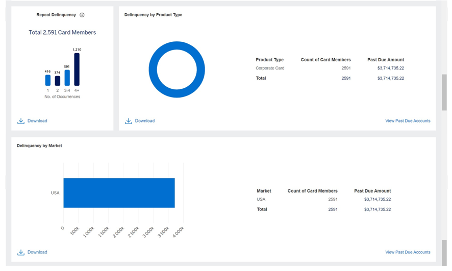
- Analyze delinquency and late payment fee across Card types and locations.
- View and download Card account level detailed information.
- Filter out Card accounts which repeatedly go delinquent or are charged late payment fees.
- Send out payment reminders in bulk to delinquent Card Members for US market.
Frequently Asked Questions
The number of active Card accounts in your Card program as on the latest month in the selected time period. This includes all types of accounts in your program such as Corporate Cards, Meeting Cards, Purchasing Cards, Business Travel Accounts etc.
Zero Spenders are Card Members who have not used their Card even once in the last 12 months and each Card was issued at least 12 months back. Zero Spenders are only calculated for the individual Corporate Card product and are as on the latest month in the selected time period.
Newly Issued Cards: The number of accounts which were set up in the selected time period. This includes all types of accounts in your program such as Corporate Cards, Meeting Cards, Purchasing Cards, Business Travel Accounts etc. Cancelled Cards: The number of accounts which were cancelled in the selected time period. This includes all types of accounts in your program such as Corporate Cards, Meeting Cards, Purchasing Cards, Business Travel Accounts etc. .
The number of transactions are the total number of charges excluding reversals or refunds, payments, and adjustment charges in the selected time period. This includes charges on all types of accounts in your program such as Corporate Cards, Meeting Cards, Purchasing Cards, Business Travel Accounts etc.
Average Transaction Amount is the measure of the average amount that the Card Member spends each time the Card account is used. This includes charges on all types of accounts in your program such asCorporate Cards, Meeting Cards, Purchasing Cards, Business Travel Accounts etc.
This is the classification of the merchant or service establishment’s industry.
All the data in the dashboard is refreshed monthly.
24 months of data is available in the Spend and Cards-in-force Dashboard except for the Zero Spenders where only 12 months of historical data is available.
Error in the Year-on-Year change percentage implies that the value of the metric in the previous comparison period was either zero “0” or unavailable.
Displayed language can be changed using the language selection on the top right side of the page, next to the currency selection.
Displayed currency can be changed using the currency selection on the top right side of the page, next to the language selection.
You can download the information available on the Insights Hub by clicking on the Download button displayed in the widgets on the bottom left side. You can choose to download the information in available formats like JPG, CSV, Excel, PDF, and PPT.
Frequently Asked Questions
Delinquency is the act of failing to make timely payments of the dues owed by the credit card user, resulting in overdue or missed payments.
The number of Cardmembers who have unpaid balances past their 30-day billing period.
Unpaid balances past the bill generation date of the card members. For Insights Hub, we are showing this data only from 30 to 179 days of delinquency.
Delinquency as of now. This data is refreshed every eight hours.
The combined late fees that have been charged to the account, along with any goodwill credits and late fee reversals that have been issued against that balance.
Interim delinquency related data like Amount Past Due and Accounts past due is refreshed every eight hours. LPC and Delinquency Trends related data is refreshed monthly.
a) Select the card members you want to send an e-mail(more than one card member) from “View Delinquent Card Members” page
b) Click on “Email All” button.
c) Edit the e-mail template, if needed.
d) At the bottom right corner of the e-mail template, click on “Download” which will download a excel based utility (file name: American Express Bulk Dunning Tool.xlsm) to send payment reminders to multiple card members.
e) Once downloaded, open the file. (Software required: Microsoft Excel)
f) Tool has multiple sections to incorporate the essential parameters for sending payment reminders. An email will be sent individually to every card member directly from the tool on clicking “Send Email”.
Note: This tool should work only with Outlook for Windows.
Frequently Asked Questions
This tool can give you visibility into your Card Members’ spending. You can choose from a curated list of spending categories to help you monitor your Card Members’ compliance with your company’s T&E policy. Based on your selections, this tool provides summary overviews and detailed information of highlighted spending to monitor at the account and transaction level. Please note that this tool includes spending data from Corporate Card and Corporate Purchasing Card accounts only.
You can go over to the ‘Customize’ section to select
from preset spending categories or customize from a curated
list of spending categories to define the specific types of spending you want to monitor.
‘Presets’ are a set of pre-selected spending categories to help you start monitoring. You can go over to the ‘Customize’ section to learn more and define the specific types of spending you want to monitor.
Identified spending, accounts, and transactions refers to the spending (or accounts and transactions) on the spending categories you have chosen to monitor.
You can filter data by Control accounts (MCA / ICA / BCA), account types, spending categories, highlighted amount, and merchant category.
Go to the ‘Monitor Account Spending’ or ‘Monitor Account Transactions’ pages using the navigation bar. Here, you’ll see the accounts or transactions highlighted based on the categories you’ve chosen to monitor.
On the ‘Monitor Account Spending’ page, you can use the ‘Identified Categories’ and ‘Merchant Categories’ filters to look for accounts with specific type of spending.
On the ‘Monitor Account Transactions’ page, you can use the ‘Identified Categories’, ‘Merchant Categories’ and ‘Transaction Amount’ filters to look for specific types of transactions.
On the ‘Monitor Account Spending’ page, click on the expander icon next to each account to see the type of spending for which it was highlighted.
On the ‘Monitor Account Transactions’ page, click on the expander icon next to each transaction to see the type of spending for which it was highlighted.
On the ‘Monitor Account Spending’ page, click on the hyperlinked ‘Identified Transactions’ which will take you to the ‘Monitor Account Transactions’ page. Here, you’ll see all the transactions highlighted for the respective account.
On the ‘Monitor Account Transactions’ page, click on the overflow menu at the end of the table next to each transaction and select ‘Email Card Member’. This will open an email template which you can edit as you prefer. Clicking on “Generate Email” will open a draft on the Microsoft Outlook email application on your system with the template. This functionality is limited to the Microsoft Outlook email service and will only function if you have the Microsoft Outlook application installed on your system. This capability cannot generate the email draft on Microsoft Outlook logged in on your web browser. The email will be sent from the email account configured on your Microsoft Outlook email application and not from an American Express email account.
On the “Monitor Account Transactions” page, you can apply desired labels to the transactions you’re monitoring. You can also filter transactions based on the labels you’ve applied. There are five
labels you can use:
• Reviewed – Okay
• Investigating
• Out of Policy
• Commented (This label is automatically applied when you add a comment to a transaction.)
• Emailed (This label is automatically applied when you generate an email draft for a Card Member.)
Note: These transaction labels are either applied directly by the Program Administrator or are automatically generated as a result of
actions taken by the Program Administrator—such as adding a comment or drafting an email related to the transaction. These labels are not applied by American Express. American Express makes no representation or warranty regarding the nature, or appropriateness of any transaction to which such labels may be applied.
Monitor Spending Terms & Conditions
1To get access to Insights Hub, you must be enrolled in American Express @ Work® and have access to @ Work Reporting.
2Insights Hub is currently available in the USA and select international markets. Visit the @ Work Insights Hub Resource Center to learn more.
3The Monitor Spending tool within Insights Hub is currently available in the USA and GDC markets.
4This tool is provided for informational use only. It does not replace or supersede any payment or other obligations set forth in the
agreement(s) related to Company’s Corporate Program, any Card Member’s Corporate Card account, or any Corporate account billing
statement. The tool is not intended to prevent, detect or remediate any type of risk, including, but not limited to, unauthorized use.
5This tool does not block Card transactions at any merchant categories (MCC).
6This tool is not designed to integrate with expense management systems (EMS).
7This tool includes spending data from Corporate Card and Corporate Purchasing Card accounts only.
8 These categories use American Express’s internal merchant classifications. These classification may differ from the way you or third
parties classify merchants. American Express makes this information available “as is” with no warranty of accuracy or fitness for a
particular purpose.
9American Express may restrict or prohibit Card transactions for some of these categories in certain countries.
10The Corporate Card accounts are issued solely for business purposes only and should be used only in accordance with Company’s
policies and procedures.
11The functionality to generate an email draft is limited to Microsoft Outlook email service and will only function if you have the Microsoft
Outlook application installed on your system. This capability cannot generate the email draft on Microsoft Outlook logged in on your web
browser. The email will be sent from the email account
configured on your Microsoft Outlook email application and not from an American Express email account.