



What's in this article?
3 Min Read | Published: May 9, 2024 | Updated: May 5, 2025
How to pay a payee with your American Express® Business Line of Credit
American Express customers can pay a U.S. vendor directly* with loan funds drawn from their Business Line of Credit.
Paying a vendor using your Business Line of Credit can help you save time and build stronger relationships. For example:
- If your payee doesn’t accept credit cards, then you can quickly pay that payee with your Business Line of Credit
- If you don’t have enough cash to cover an expensive bill, then your Business Line of Credit has your back.
The following guide will take you through making direct payments from your Business Line of Credit to a vendor.
Do I have to pay for this feature?
No, American Express doesn’t charge a fee to send a payment to a vendor using your line of credit. However, you will pay loan fees for the loan you draw to make the payment. You pay a loan fee only on the amount you use, during the months you have an outstanding balance.
Will a vendor be charged to receive a payment?
No, a vendor won’t be charged a fee by American Express to receive a payment from you using your Business Line of Credit.
Start the pay a vendor process from the Business Line of Credit home screen.
- Simply click the “Send a payment” button.
- You’ll either search for your payees in our database or add a payee (U.S. based vendor/supplier) to start making payments and transfers today.
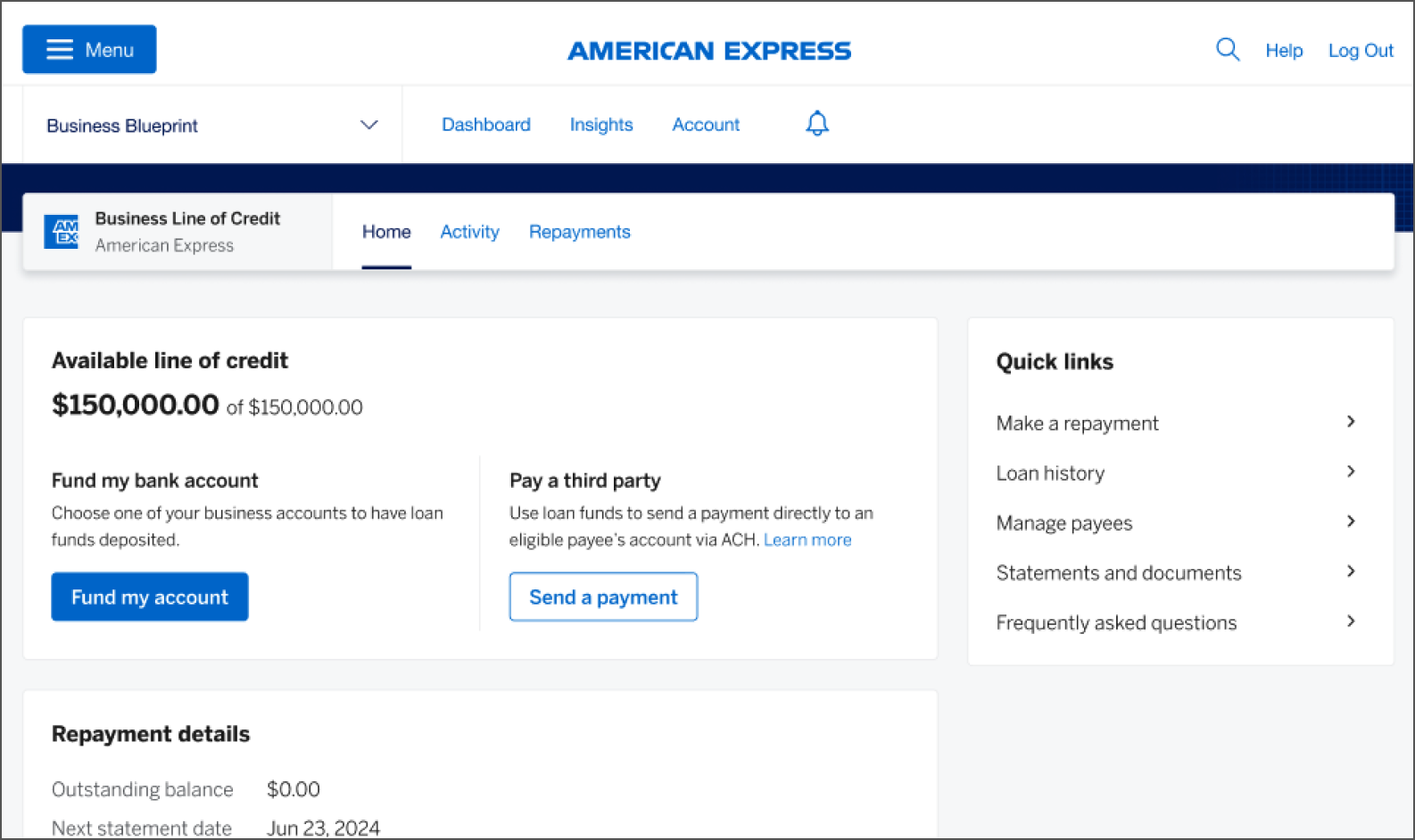
For illustrative purposes only
If you don’t have any existing eligible payees, then you’ll see the screen that explains how to add a payee and make a payment with your available loan funds.
Step 1: Click the “Add payee” button
NOTE: If you have existing eligible payees, you’ll see a list of your payees and be able to add a new payee by clicking the “Add payee” button.

For illustrative purposes only
Step 2: Provide your payee’s name and bank information
All fields required, except nickname. Click “Continue” button to fill in the rest of payee information.
NOTE: You’ll need to verify your identity. When prompted, enter the 6-digit code sent to the phone number associated with your American Express account. Click “Continue” button.

For illustrative purposes only
Step 3: Receive decision
If your payee is eligible, then you’ll receive confirmation that your payee was added.

For illustrative purposes only
NOTE: You can only pay payees that are eligible. We may decline a payee if we determine the payee isn’t eligible to receive payments from us (a) for reasons we determine acting in our sole discretion or (b) for any other reason (including reasons beyond our control).
Step 1: Select a payee
If you have existing eligible payees, you’ll see a list of your payees and be able to add a new payee by clicking "Add payee" (see option 1 outlined above for instructions).

For illustrative purposes only
Step 2: Enter the loan details
- Enter the amount of the payment.
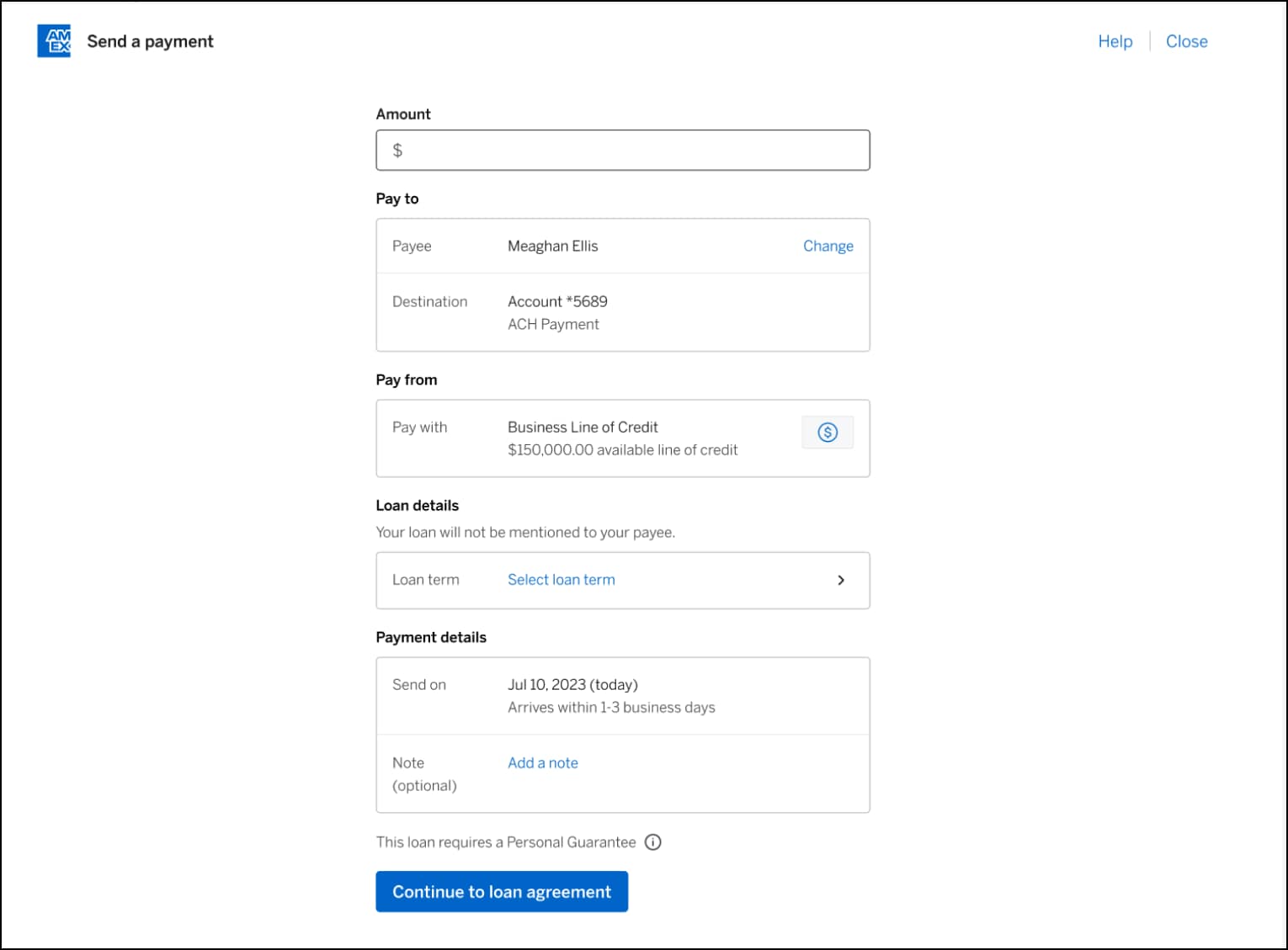
For illustrative purposes only
- Choose a loan term from options available to you.
American Express® Business Line of Credit offers two types of loans:
Installment loans are repaid in fixed monthly amounts along with a portion of the loan fee over a set period. These loans may be available in 6-, 12-, 18-, or 24-month loan term lengths, depending on your eligibility, and they can be used for disbursements to your bank account or for direct payments to an eligible payee*.
Single repayment loans are available in 1-, 2-, or 3-month loan term lengths, subject to eligibility; they can only be disbursed as a payment directly to an eligible payee*; and they do not require monthly repayments. Single repayment loans may become available to eligible new and existing Business Line of Credit customers at different times.
Not all customers are eligible for all loan terms lengths.
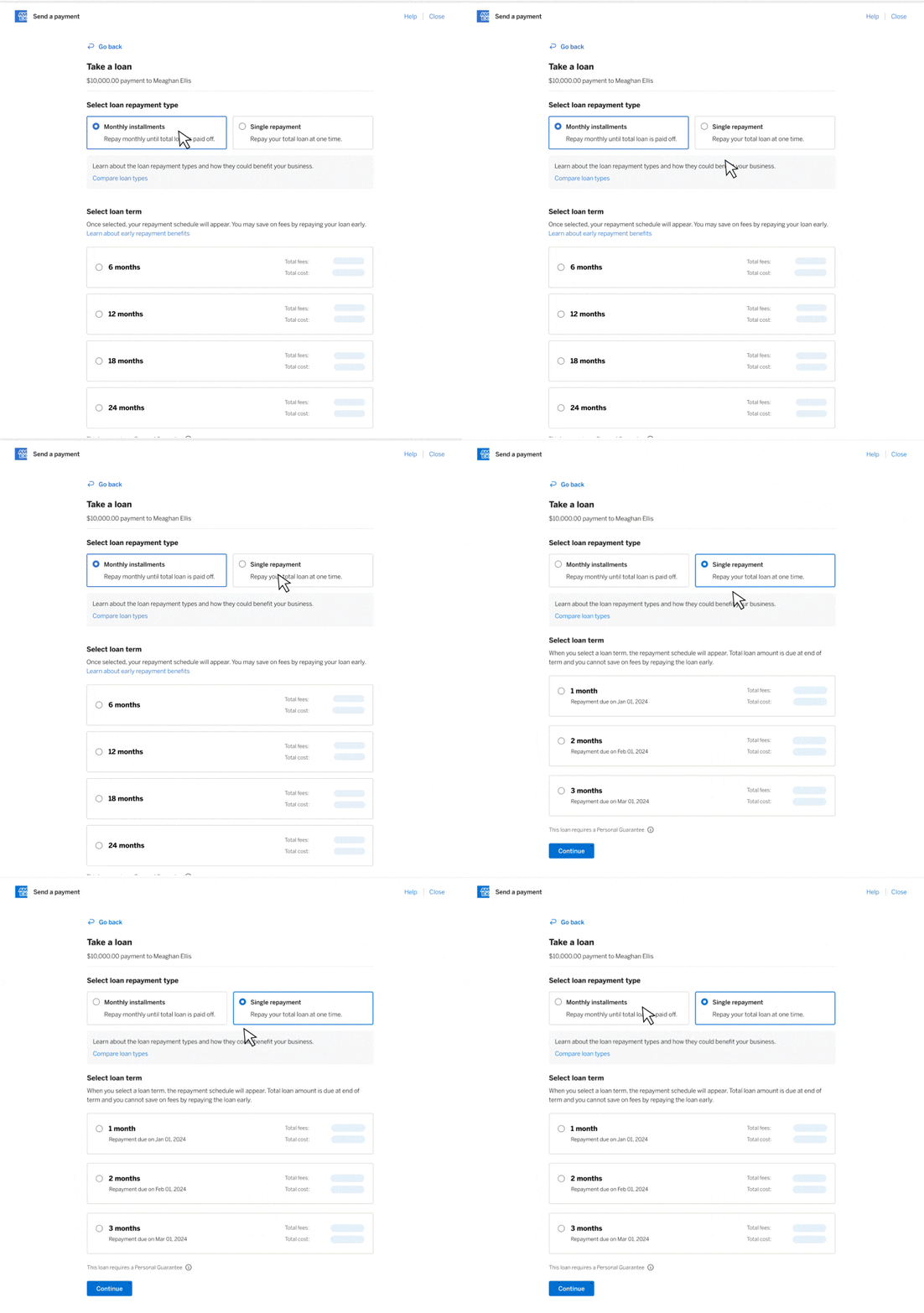
For illustrative purposes only
Step 3: Choose loan purpose
You’re almost there. Tell us how you plan to use the funds. Click “Continue” button.
NOTE: If your new loan is greater than $10,000, you’ll be taken to a screen with a dropdown where you’ll be asked how you plan to use the funds. Please select the most fitting answer.
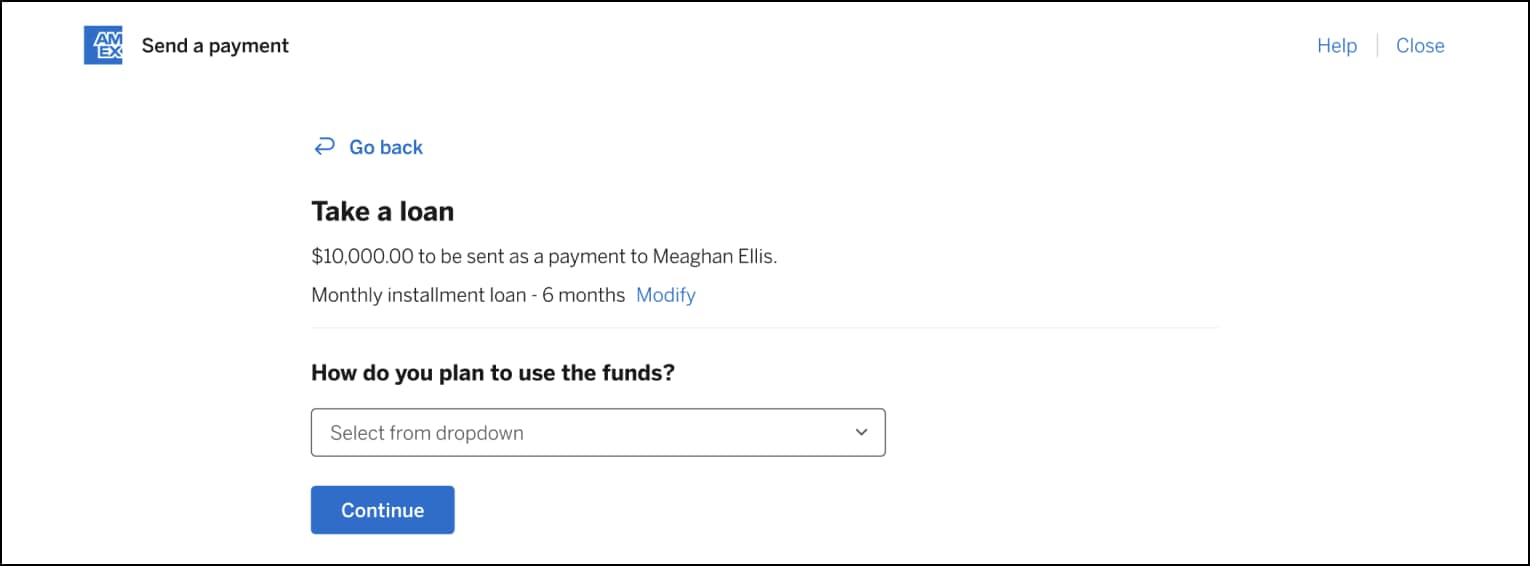
For illustrative purposes only
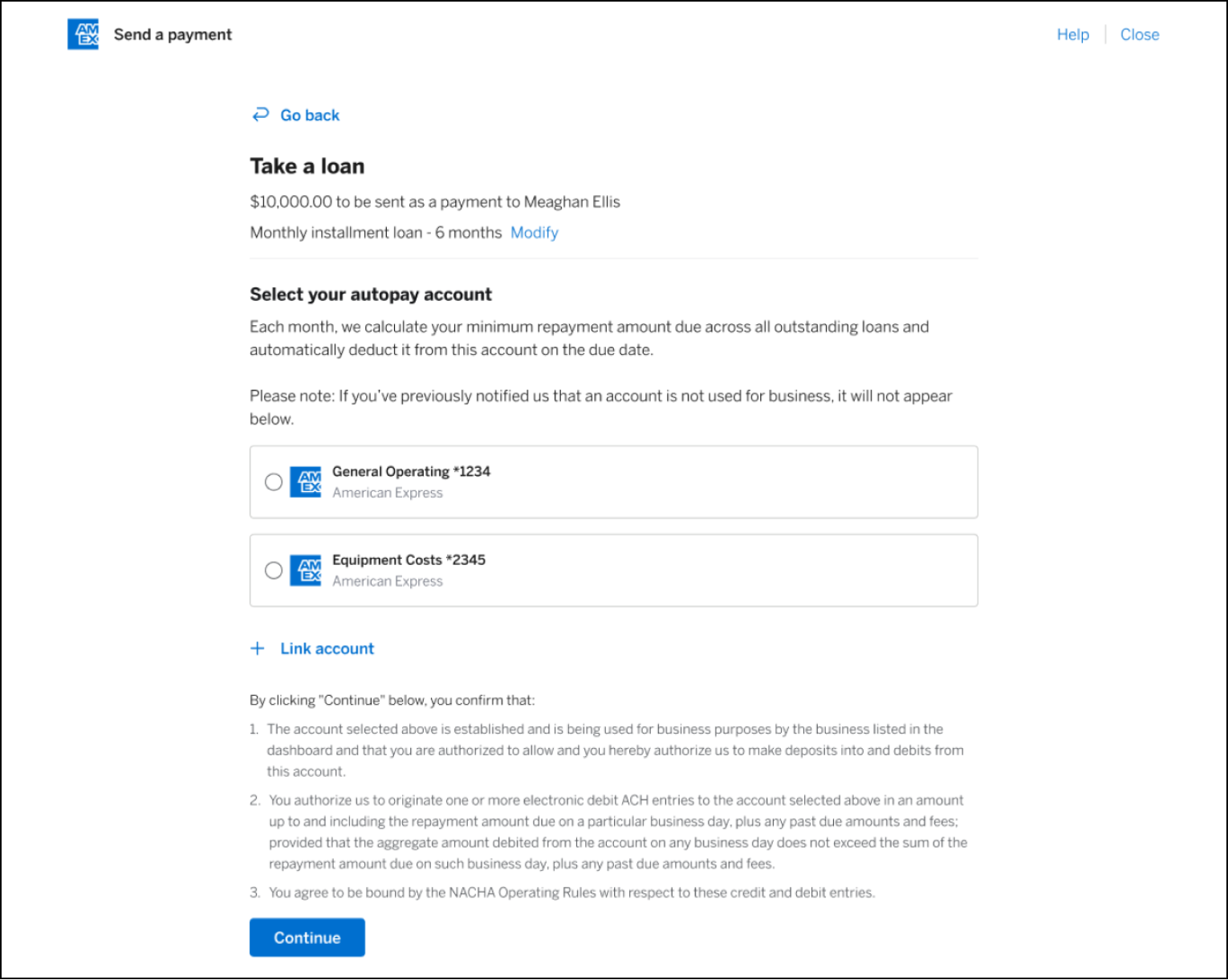
Step 4: Select your autopay account
We require customers to set up their autopay account, from which we will automatically deduct the monthly payments due in accordance with the loan agreement.
NOTE: If you haven’t yet selected an autopay account, you will be taken to a screen requiring you to do so before continuing.
For illustrative purposes only
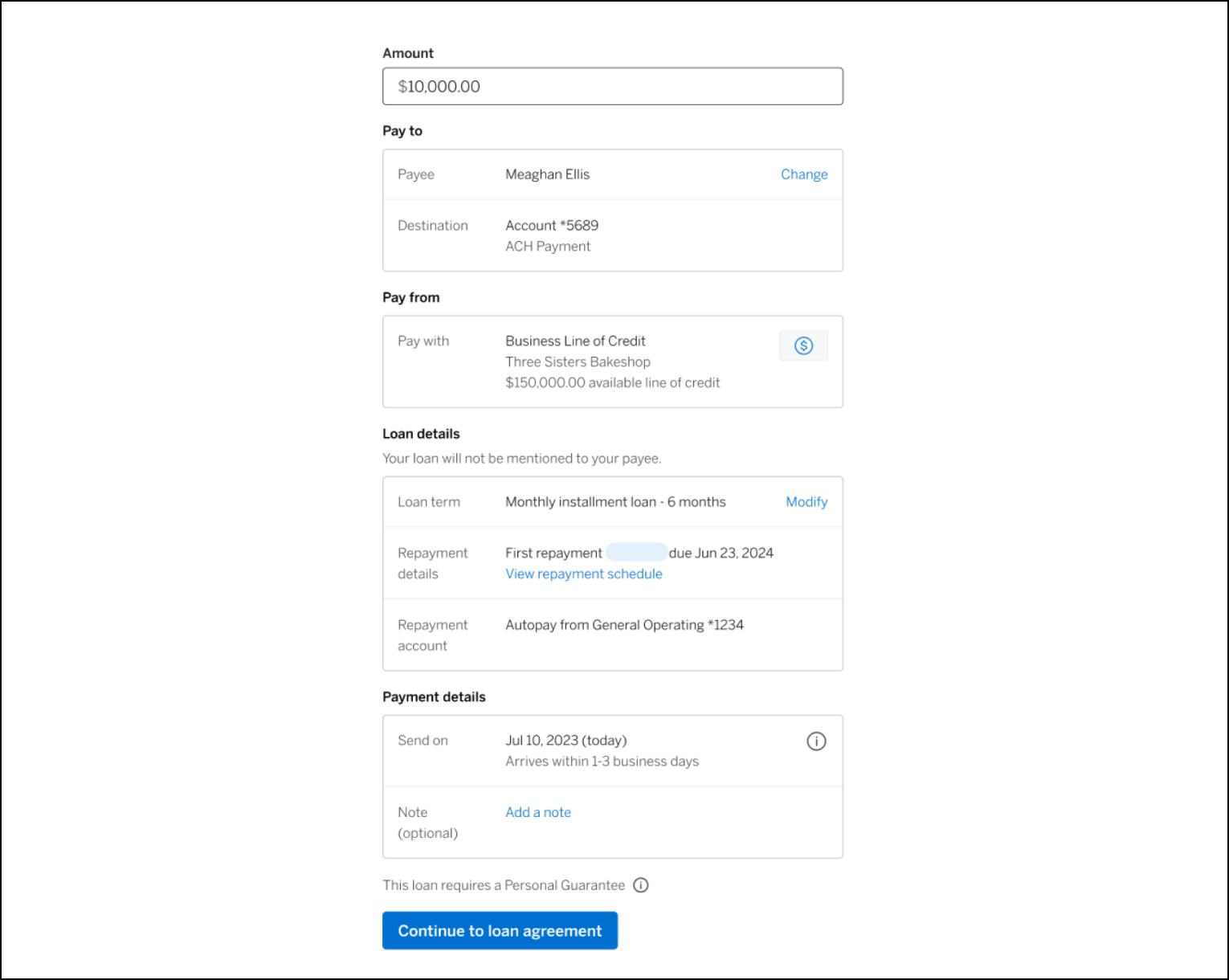
Step 5: Review your details
This is your chance to double-check the details. Are the loan amount, payee, and destination all accurate? If so, click the “Continue to loan agreement” button.
For illustrative purposes only
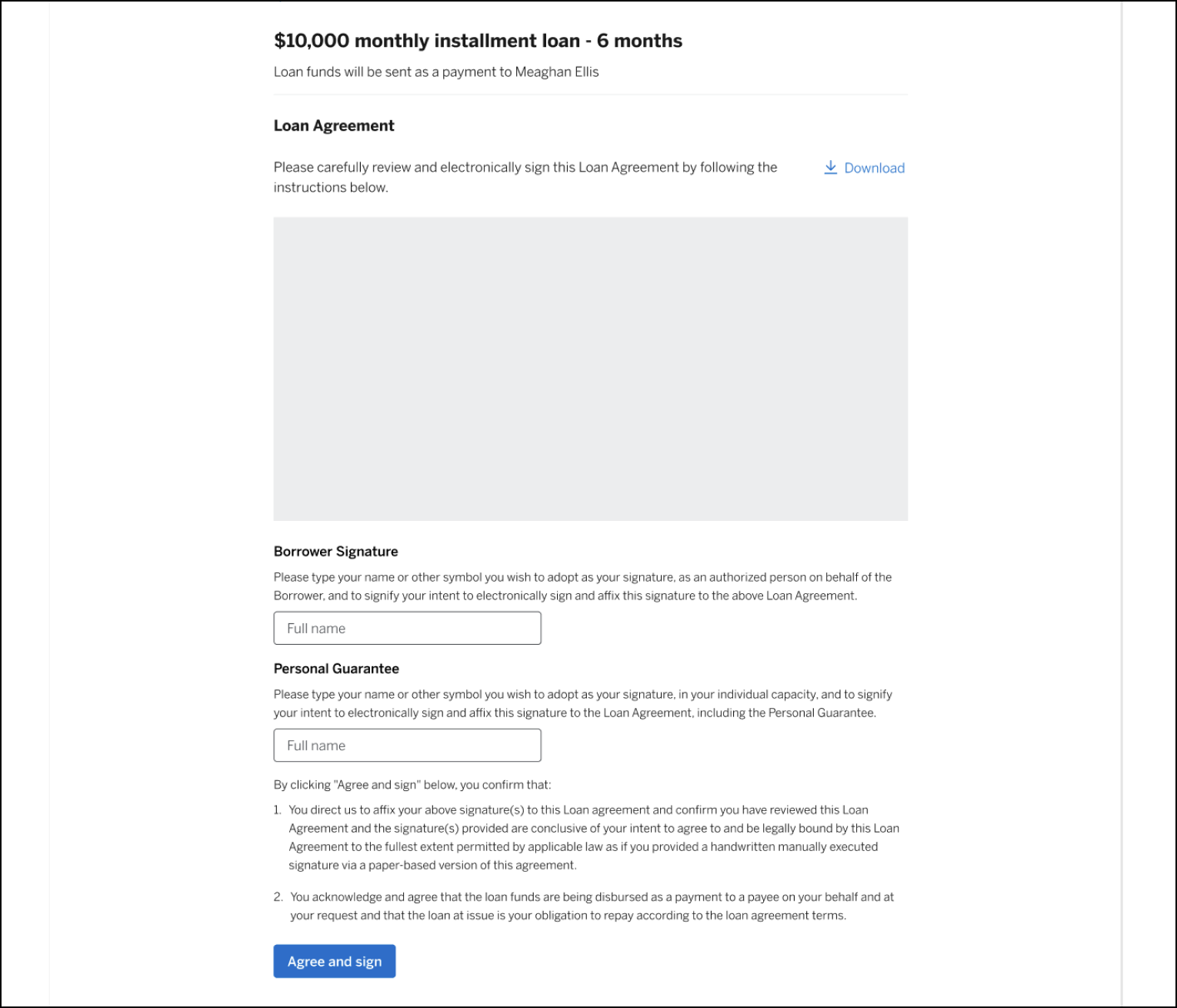
Step 6: Sign loan agreement
You’ve reached the last step before funds are sent. Review the loan agreement and sign. That’s it – your payee should receive funds within 1-3 business days.
NOTE: Payments may be delayed for several reasons and the payee’s bank may have their own policy regarding how quickly to post a payment.
For illustrative purposes only
Step 1: Manage payees
Under “Quick links” select “Manage payees” to view all payees including ineligible payees.

For illustrative purposes only
There, you’re able to add new payees and edit payee information.

For illustrative purposes only
What are some examples of payee payments?
Here are some examples of how you could use your Business Line of Credit to pay an eligible business payee:
- To pay a supplier for raw materials
- To pay a vendor for goods or services
- Large business-related bill payments
* If you elect to have your loan funds disbursed directly to a third party payee, you are required to provide accurate and complete payee information. Payees must be located in the US or US territories. The per transaction payee payment maximum is the lesser of your then available line of credit and $100,000. Not all payee industry types are eligible. We may refuse a payee in our discretion or for reasons beyond our control. Loan funds sent to your payee may take up to three (3) banking days to post to the payee’s business bank account, although payments may be delayed for a number of reasons and the payee’s bank may have their own policy regarding how quickly to post a payment.
STILL NEED HELP?
Reach out to us for further guidance.
Deposit accounts offered by American Express National Bank. Member FDIC.
TERMS AND CONDITIONS
American Express Business Blueprint™
American Express Business Blueprint™ is the small businesses digital experience that allows a customer to view on one digital dashboard summary account information for the following American Express small business products: American Express® Business Cards, American Express® Business Line of Credit, and American Express® Business Checking. The customer can also choose to link their third-party issued business bank accounts and business credit cards to Business Blueprint. Not all third-party accounts or cards can be connected to Business Blueprint. Business Blueprint allows the customer to view data insights and track their business cash flow and expenses by viewing reports that American Express prepares using the customer’s linked account information. While the cash flow management service from Business Blueprint is currently free, each of the business products from American Express that are visible in Business Blueprint has its own fees, eligibility criteria, application process and approval requirements. The Business Blueprint service (including any data insights provided to the customer) does not constitute legal, tax, financial or accounting advice, and is not a substitute for obtaining competent personalized advice from a licensed professional. You should seek professional advice before making any decision that could affect the financial health of your business. American Express makes no representations as to the accuracy, completeness or timeliness of the reports, data or account information that are available to the customer from Business Blueprint.™
American Express® Business Line of Credit
Terms and Conditions for an American Express® Business Line of Credit apply. Visit https://www.americanexpress.com/en-us/business/blueprint/terms-and-conditions/business-line-of-credit/ for more information.
American Express® Business Checking and Business Savings
We are currently accepting applications from eligible U.S. businesses. Not all applicants will be approved for a Business Checking and Business Savings accounts. Select industries or businesses engaged in certain activities are currently ineligible, such as money service businesses, cryptocurrency, internet gambling businesses, and marijuana related businesses.
Membership Rewards® Program
Terms and Conditions for the Membership Rewards® program apply. Visit membershiprewards.com/terms for more information. Participating partners and available rewards are subject to change without notice.
The value of Membership Rewards® points varies according to how you choose to use them. To learn more, go to www.membershiprewards.com/pointsinfo
American Express and Amex are registered trademarks of American Express.