




How can we help you?
Popular "How To" Articles

Find By Category
- Review how to initiate, track, and manage applications
- Learn how to complete applications on behalf of employees
- Learn about new features
- Access forms
- Use key features of @ Work with the help of bite-sized educational content
- Improve your program management capabilities
- Manage your Corporate accounts easily
- Understand how to view and download Statements in @ Work
- Learn how to configure payments on Corporate accounts
- Explore all the features through video tutorials and guides
- Leverage the benefits of interactive and simplified learning
- Understand how reconciliation tools help streamline your expense management
- Grasp actionable insights from your spending reports using our informative videos
- Get a comprehensive view of expenses
- Plan your spending policies better
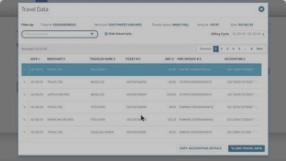
Explore the different options to manage your business travel expenditures with @ Work Reconciliation.

Earn points for your business or reward your employees with the Membership Rewards®2 Programs. Membership Rewards points can be used for travel, gift cards, experiences, and much more. See what work best for you and your company.
Everything you need to get started
Get familiarized with the prominent features of @ Work and complete your tasks quickly.
Quick access to Card Members activity overview
With the @ Work Reconciliation tool, you can select and
view recent transaction activities of each Card Member.
Quick access to Card Members activity overview
With the @ Work Reconciliation tool, you can select and view recent transaction activities of each Card Member.

Card application activities in the U.S. are moving to an enhanced Global Apply for Card
An enhanced Corporate application experience in the U.S. is now available on Global Apply for Card (GAFC). Program Administrators can now manage additional application types, including Corporate Purchasing Card (CPC), Corporate Meeting Card (CMC), and more, with new features such as department applications and automatic address validation to help streamline the application process.
All U.S. Corporate application activities are moving to the uplifted GAFC, and the legacy Apply for Card (AFC) will soon be phased out.
Learn about the transition and how your application activities will change.
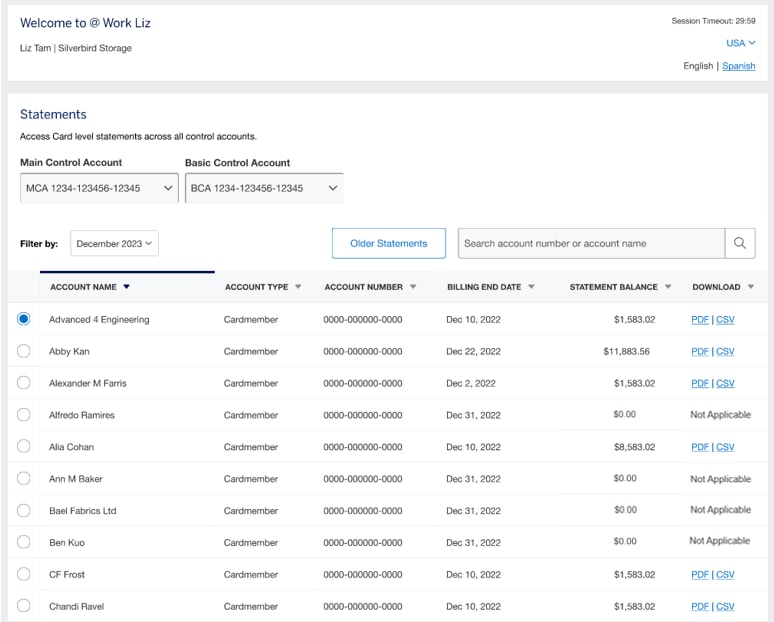
Introducing Card Member Statements in your new Statements Hub on @ Work®
The new Statements Hub provides an enhanced and modern user interface for faster access to your Corporate Program statements. This self-serve capability is designed for you to quickly locate, view, and download statements for your Corporate Program.

New to Insights Hub: Monitor Spending
The new Monitor Spending tool gives you visibility into your Card Members’ spending. You can choose from a curated list of spending categories to help you monitor your Card Members’ compliance with your company’s T&E policy. Based on your selections, this tool provides summary overviews and detailed information of highlighted spending to monitor at the account and transaction level.
Note: Over the coming weeks, this enhancement will be rolled out in phases to our valued customers and may not be available yet for all Accounts. If you have any questions, please contact your local PA Servicing team.
Applicable Markets: US, GDC
Self-Service ‘My Settings’ Is Now Available
The new My Settings enhancement for PAs is now available. This convenient,
time-saving online feature helps PAs to manage their Two-Factor Authentication and login credentials via the @ Work homepage, eliminating the need to call the service centre. Within My Settings, PAs can also update alert preferences under the Communications Preferences section.
Currently available for: UK, IEC, Spain, Sweden, Norway, Netherlands, Italy, Germany, Austria, France, Finland, Belgium, Denmark, Australia, Hong Kong, Singapore, New Zealand, Japan, Taiwan, India, Thailand, US, GDC, Canada, Argentina, and Mexico.
*Please note that the Communications Preferences tab is not available for Finland and Belgium and will only be available for the following markets when the New Homepage design is released: Canada, Mexico, Argentina, India, Australia, New Zealand, Japan, Hong Kong, Taiwan, and Singapore.

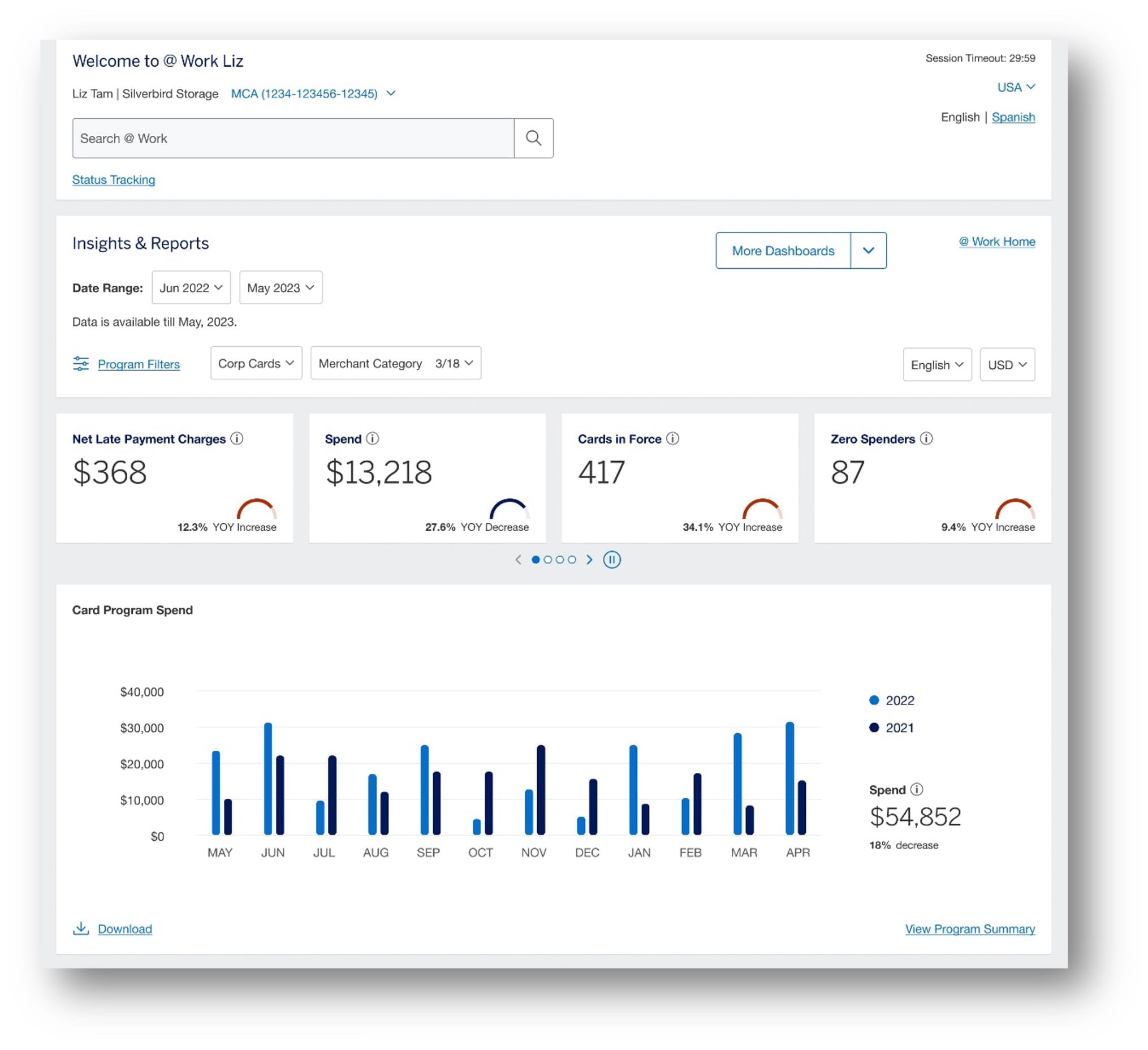
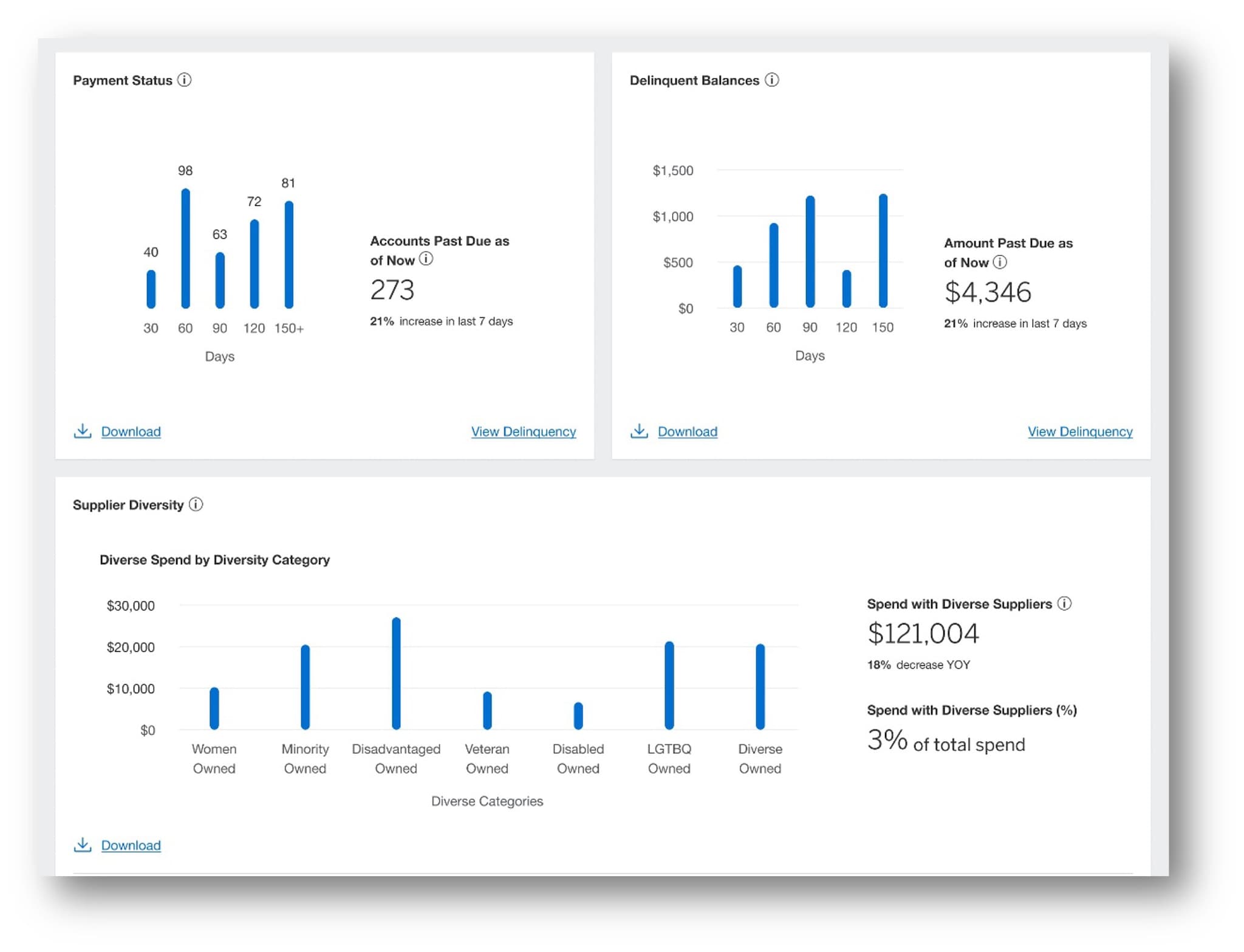
Introducing the new Insights Hub: Data where and when you need it
Access Card Program information from one comprehensive interactive Hub. With a clear up-to-date view of spending, Cards and delinquency details, your Insights Hub brings you powerful insights, analysis, and actions for more productive program management.
Applicable Markets US, GDC
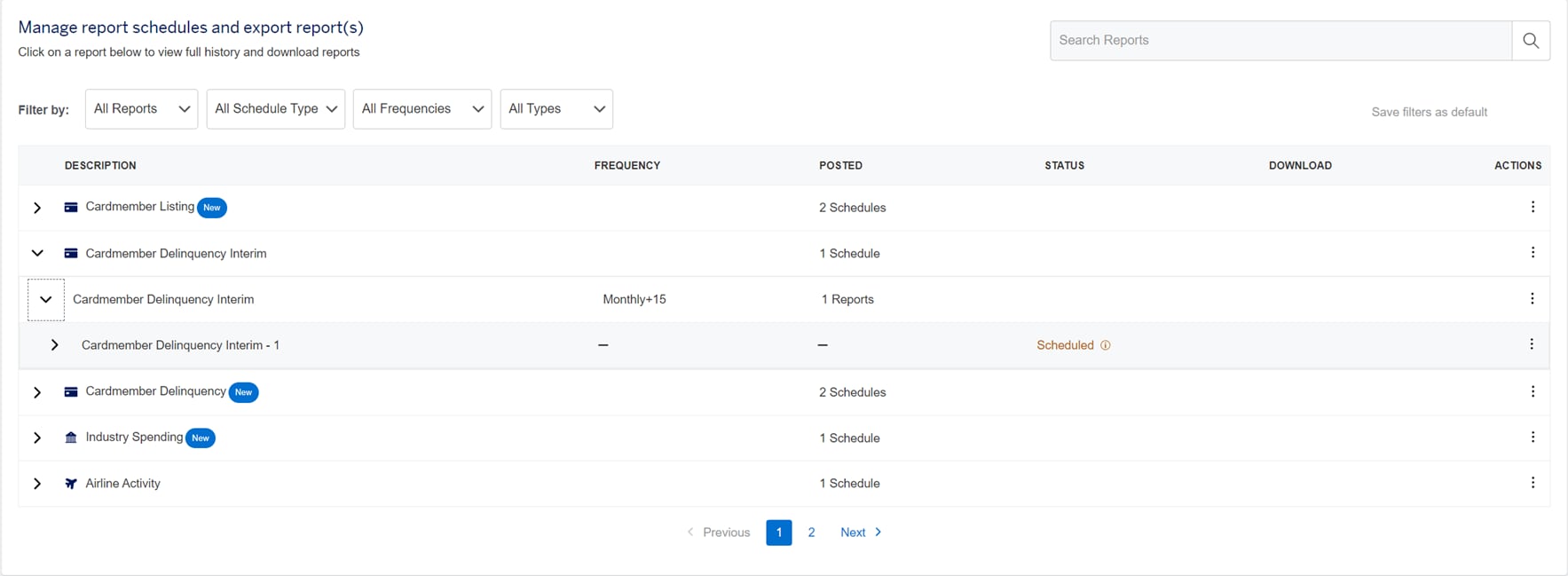
Refreshed @ Work Reporting
Enjoy a quicker, more efficient way of managing reports while maintaining the core functionality you rely on. Consolidated views and advanced filters give Program Administrators a more intuitive self-service experience.
Recently launched in GDC and United States.

Bulk Individual Membership Rewards eligibility at the touch of a button
You can now use just one click to apply Individual Membership Rewards eligibility for a complete Business Control Account (BCA) in your company, saving you time with the reduced touchpoints.
Now available in the US.
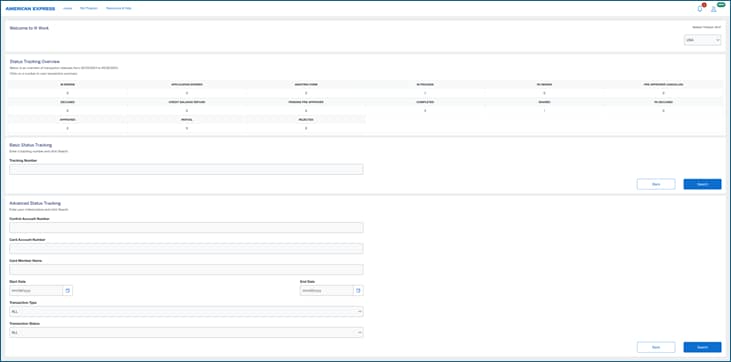
Get ready for a smarter Status Tracking experience on American Express @ Work®
A new user program has been launched to improve your Status Tracking experience. It’s all part of our aim to transform @ Work into one globally consistent user experience that delivers more seamlessly.
Intuitive navigation and relevant insights let you track, search, view and consolidate transactions quickly and easily.
From fewer Status Tracking pages and simplified navigation to enhanced search capabilities, it’s all designed to enhance your experience – and your business.
Simplify accounting with
@ Work Reconciliation

Simplify accounting with
@ Work Reconciliation
Allocate the right amount to the right category with
minimal effort and maximum accuracy. Learn how
to work with the @ Work Reconciliation tool.
Allocate the right amount to the right category with minimal effort and maximum accuracy. Learn how to work with the @ Work Reconciliation tool.
Can't find what you are looking for?
Chat With Us
Please log in to @ Work using your User ID and Password to chat with a Customer Care Professional. Customer Care Professionals are available Monday - Friday 9 AM-5 PM ET.
Get Support
Find answers to your questions or
get in touch with our support center to help get back
on track immediately.
Terms & Conditions
1Use of American Express @ Work ® is restricted to employees, contractors and/or agents that the Company, and its representatives designate for the sole purpose of performing online account queries and maintenance, including accessing and/or creating reports relating to the Company's American Express® Corporate Card programs. @ Work is available to all companies with an American Express Corporate Card program.
Enrollment is required. To enroll in @ Work please contact your American Express Representative or call 1-888-800-8564.
2Membership Rewards® Programs
Individual Membership Rewards Program
Enrollment in the Membership Rewards® program is required. The Corporate Green Card and the Global Dollar Card - American Express® Corporate Card is charged a $55 annual enrollment fee. A program fee is not applied for the Corporate Gold Card, Corporate Platinum Card®, Global Dollar Card - American Express® Corporate Platinum Card, and Global Dollar Card - American Express® Corporate Executive Gold Card. Some Corporate Cards are not eligible for enrollment. For a full list of eligible Corporate Cards, please see the full Membership Rewards Terms and Conditions. Card Member eligibility for enrollment is based upon the company’s participation in the Membership Rewards program. Get one Membership Rewards point for every dollar or for every two dollars of eligible purchases charged on enrolled Corporate Green Cards, Corporate Gold Cards, and Corporate Platinum Cards®, depending on the earn rate selected by the company for its employees enrolled in the Membership Rewards Program. Eligible purchases are purchases for goods and services minus returns and other credits. Eligible purchases do NOT include fees or interest charges, cash advances, purchases of travelers checks, purchases or reloading of prepaid cards, or purchases of other cash equivalents.
Terms and Conditions for the Membership Rewards® program apply. Visit membershiprewards.com/terms for more information. Participating partners and available rewards are subject to change without notice.
The value of Membership Rewards points varies according to how you choose to use them. To learn more, go to https://global.americanexpress.com/
rewards/calculator.
Corporate Membership Rewards Program
Enrollment in the Corporate Membership Rewards program is required. Only the American Express® Corporate Green Card, American Express® Corporate Gold Card, and Corporate Platinum Card® from American Express are eligible to enroll in the Corporate Membership Rewards program. The Program Administrator is charged a $90 annual enrollment fee for each enrolled Corporate Green Card. A program fee is not applied for the Corporate Gold Card and Corporate Platinum Card®. Get one Corporate Membership Rewards point for every dollar of eligible purchases charged on enrolled American Express® Corporate Cards. Eligible purchases are purchases for goods and services minus returns and other credits. Eligible purchases do NOT include fees or interest charges, cash advances, purchases of travelers checks, purchases or reloading of prepaid cards, or purchases of other cash equivalents. If the Corporate Card Member is transferring from an existing Membership Rewards program to the Corporate Membership Rewards program, the Card Member will have 30 days to use any existing Membership Rewards points before they are forfeited.
The redemption value of Corporate Membership Rewards points varies according to how you choose to use them.
For the full terms and conditions for the Corporate Membership Rewards® program please visit americanexpress.com/corporatemrterms for more information. Participating Corporate Membership Rewards partners, available rewards, and point levels are subject to change without notice.
Monitor Spending
1To get access to Insights Hub, you must be enrolled in American Express @ Work® and have access to @ Work Reporting.
2Insights Hub is currently available in the USA and select international markets. Visit the @ Work Insights Hub Resource Center to learn more.
3The Monitor Spending tool within Insights Hub is currently available in the USA and GDC markets.
4This tool is provided for informational use only. It does not replace or supersede any payment or other obligations set forth in the
agreement(s) related to Company’s Corporate Program, any Card Member’s Corporate Card account, or any Corporate account billing
statement. The tool is not intended to prevent, detect or remediate any type of risk, including, but not limited to, unauthorized use.
5This tool does not block Card transactions at any merchant categories (MCC).
6This tool is not designed to integrate with expense management systems (EMS).
7This tool includes spending data from Corporate Card and Corporate Purchasing Card accounts only.
8 These categories use American Express’s internal merchant classifications. These classification may differ from the way you or third
parties classify merchants. American Express makes this information available “as is” with no warranty of accuracy or fitness for a
particular purpose.
9American Express may restrict or prohibit Card transactions for some of these categories in certain countries.
10The Corporate Card accounts are issued solely for business purposes only and should be used only in accordance with Company’s
policies and procedures.
11The functionality to generate an email draft is limited to Microsoft Outlook email service and will only function if you have the Microsoft
Outlook application installed on your system. This capability cannot generate the email draft on Microsoft Outlook logged in on your web
browser. The email will be sent from the email account
configured on your Microsoft Outlook email application and not from an American Express email account.