



American Express® Map: Frequently Asked Questions
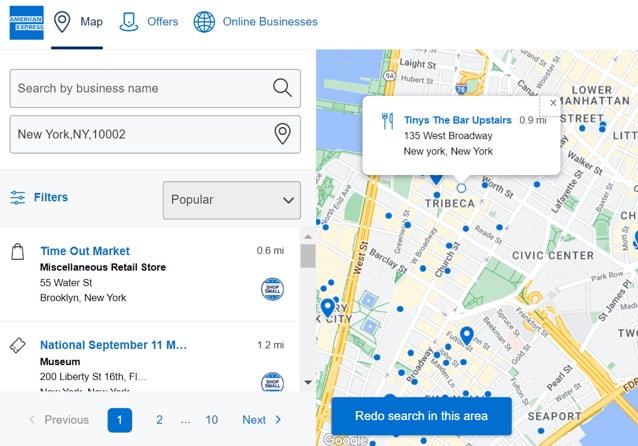
American Express Maps and the Shop Small® Map
American Express Maps displays qualifying American Express® Card-accepting businesses with a physical location for customers to easily shop at the places they love and discover new favorite places.
The Online Directory within American Express Maps lists qualifying businesses that only accept online transactions or those that do not have a physical location.
If your business is on the American Express Maps, customers can search for and see important information about your business, including business hours.
Your business may also be included in local recommendations that appear to Card Members on the Map.
The Shop Small Map is a filtered experience within American Express Maps. The Shop Small Map only displays U.S. businesses that meet certain Shop Small eligibility criteria. The criteria are outlined in FAQ 4.
Note that businesses on the Shop Small Map also appear on American Express Maps.
There are two ways a business can qualify to appear on American Express Maps:
- A business can appear on American Express Maps if they qualify for the Shop Small Map. For Shop Small Map qualification criteria, please see FAQ 4.
- Otherwise, a business can appear on the American Express Maps (but not the Shop Small Map) if they satisfy the following criteria:
a. Must be an American Express® Card-accepting business.
b. Must do business in one of our selected industries: dining, lodging, supermarkets, drugstores, office supplies, shipping, construction, wholesale, department/ retail stores, computer hardware, computer software, cloud computing services, manufacturing, wireless telephone services, medical equipment, retail trade, home furnishings, hardware, and other services.
c. Must do business in one of our selected geographic areas to show up in that market’s respective Map. These geographic areas consist of the following: United States, Canada, Mexico, Argentina, United Kingdom, France, Germany, Italy, Spain, Netherlands, Hong Kong, Japan, Singapore, and Australia.
To appear on the Shop Small Map, businesses must meet the following Shop Small-eligible criteria:
- Must be an American Express Card accepting business.
- Must be located in the 50 United States, District of Columbia, American Samoa, Armed Forces Pacific, Federated States of Micronesia, Guam, Marshall Islands, Northern Mariana Islands, Palau, Puerto Rico, or the U.S. Virgin Islands.
- For brick-and-mortar merchants, this means that you must have at least one physical business location within these territories; for online-only businesses, this means that you must have a service area within these territories
- Must have at least 1 but no more than 25 locations (for brick-and-mortar businesses) and have no more than $7M in American Express annual charge volume.
- Must not be part of a franchise brand that has more than 100 stores;
- Additionally, if a franchise brand has more than 25 corporate-owned stores, then the entire brand is excluded.
- Must be enabled to accept American Express Cards.
- Merchants who have been with us for more than 12 months must have had at least 1 transaction in the last calendar year.
- Businesses in these industries are excluded: Government agencies, public administration, gas stations and businesses located on the same premises as a gas station, travel agencies, charities, non-profits, peer-to- peer payments, crowdfunding, trade associations, retail or residential property management companies, direct sellers (including direct sellers via online marketplace, online influencers with their own brands), and political organizations, cannabis retailers, firearms, gambling, adult entertainment.
- In some cases, if a merchant processes American Express® Card payments solely through a third-party processor (for example, those that offer the ability to accept credit cards through a card reader attached to a mobile device) or as part of an affiliate program, they may be excluded from participating on American Express Maps, depending on whether or not the third party provides sufficient data for American Express to determine if the business meets the foregoing qualifications.
- Additionally, the merchant may not automatically display on the Shop Small Map and may have to manually opt-in, see FAQ 8.
There could be a few reasons why a business may not display on the map:
- The business location(s) may not qualify. Please review the current qualification criteria in FAQ 3 to see if the business location qualifies to appear on the Shop Small Map or Online Directory.
- The business location(s) may qualify to appear, but the preference for including the business location(s) on the American Express Maps may not be set to Yes. To include a qualifying business location on the Map or directory, please follow the steps outlined in FAQ 8 and FAQ 9.
- American Express Maps only returns 100 merchants for each search. Our system takes into consideration a proprietary mix of factors to filter to those 100.
- Filtering by industry or entering more of the address information may return different search results.
The businesses on the Map are curated to help Customers explore places nearby based on what is most popular among Card Members in their area.
Only a merchant or an American Express representative authorized by the Merchant can remove their business location from the Map.
If you would like to have a business removed from American Express Maps, you should first confirm whether it appears on the Shop Small Map. This can be confirmed by clicking “filters” on the Map and verifying whether “Shop Small Map” is checked in the Feature section.
- If your business is on the Shop Small Map, you may remove it by following these steps:
- Log into your account here.* If you do not have an account, you will be directed to create one.
- If directed to your dashboard screen, click on the “Shop Small® Map Listing” link.
- When on the map, click on your business location.
- Uncheck the checkbox to indicate that you do not want to get free exposure for your business by disallowing your public business information to be seen on our Shop Small Map and other marketing channels.
- If your business is not on the Shop Small Map, but is on American Express Maps, you can contact your Client Manager to request removal from American Express Maps.
Please note that updates to the Map are not immediate. In some circumstances, it may take up to 2-3 business days for Amex to verify the requested change and for that change to be reflected in American Express Maps or Online Directory.
*To log-in to your account, you will need your Merchant ID or Access Code from Amex Communications or your User ID and password. If you are unable to login, or cannot recall your credentials to login, you can call our Shop Small servicing center at 1-833-213-0506. We are available from 9am EST to 6pm EST, Monday through Friday. You can also email us at ShopSmallHelp@aexp.com.
Only a merchant or an American Express representative authorized by the Merchant can add their business location to the Map.
- If your business is eligible to appear on the Shop Small Map as outlined in FAQ 4, you can add your business location on the Shop Small Map by following these steps:
- Log into your account here.* If you do not have an account, you will be directed to create one.
- If directed to your dashboard screen, click on the “Shop Small® Map Listing” link.
- When on the map, click on your business location.
- Check that the toggle for "Show on Shop Small® Map" is selected to indicate that you want to get free exposure for your business by allowing your public business information to be seen on our Shop Small Map and other marketing channels.
- Click the edit icon on the right side of the page to update your business location’s public information.
- Click the “Save” button after making changes in each portion of your location details to save your updates.
- If your business is not eligible to appear on the Shop Small Map as outlined in FAQ 4, but is eligible to appear on American Express Maps as outlined in FAQ 3, you can contact your Client Manager to request the addition of your business location(s) to American Express Maps.
Please note that updates to the Map are not immediate. In some circumstances, it may take 2-3 business days for Amex to verify the requested change and for that change to be reflected in American Express Maps or Online Directory.
*To log-in to your account, you will need your Merchant ID or Access Code from Amex Communications or your User ID and password. If you are unable to login, or cannot recall your credentials to login, you can call our Shop Small servicing center at 1-833-213-0506. We are available from 9am ET to 6pm ET, Monday through Friday. You can also email us at ShopSmallHelp@aexp.com.
Only a merchant can add their business location to the Map.
- If your business is eligible to appear on the Shop Small Map as outlined in FAQ 4, you can add your business location on the Shop Small Map by following these steps:
- Log into your account here.* If you do not have an account, you will be directed to create one.
- If directed to your dashboard screen, click on the “Shop Small® Map Listing” link.
- Click on your business location. A page will display your business location’s public information as it will be seen on our Shop Small Map and in other marketing channels, provided you complete the steps that follow.
- Make sure the checkbox is checked to indicate you want to get free exposure for your business by allowing your public business information to be seen on our Shop Small Map and other marketing channels.
- Click the edit icon on the right side of the page to update your business location’s public information.
- Click the “Save” button after making changes in each portion of your location details to save your updates.
- If your business is not eligible to appear on the Shop Small Map as outlined in FAQ 4, but is eligible to appear on American Express Maps as outlined in FAQ 3, you can contact your Client Manager to request the addition of your business location(s) to American Express Maps.
Please note that updates to the Map are not immediate. In some circumstances, it may take 2-3 business days for Amex to verify the requested change and for that change to be reflected in American Express Maps or Online Directory.
*To log-in to your account, you will need your Merchant ID or Access Code from Amex Communications or your User ID and password. If you are unable to login, or cannot recall your credentials to login, you can call our Shop Small servicing center at 1-833-213-0506. We are available from 9am ET to 6pm ET, Monday through Friday. You can also email us at ShopSmallHelp@aexp.com.
Possibly. Provided you meet all other eligibility criteria as outlined above, you may be eligible to appear on the Shop Small Map or Online Directory, provided that the aggregator provides enough data for American Express to determine whether your business meets the foregoing qualifications. To determine whether you are eligible, you can log in here or call us at 1-833-213-0506 between 9am ET to 6pm ET, Monday through Friday. If you qualify, you can add or update your business information, FAQ 9 and FAQ 10.
It depends. Each location displayed on the Map or Online Directory is tied to a unique Merchant Number so you can only indicate one listing preference per Merchant Number. If you have separate Merchant Numbers for your physical store and your online business, you may include one on the Map and one on the Online Directory.
However, if you use the same Merchant Number for both parts of your business, you will need to choose to be listed either on the Map or the Online Directory because you cannot be listed in both.
You can include your business in the Online Directory. This directory is for businesses that do not have a physical address for shoppers to visit. When confirming or adding your business information, make sure you update your URL, and in the Servicing section, select “Card Members cannot visit location”.
No. This process will only update your public information for use in Card Member account statements, Card Member recommendations, on the Map, Online Directory, and in other marketing channels. If you need to update your merchant account information that American Express or your third-party payment processor uses to manage your account, please call the number on your monthly statement. Likewise, if you update your billing or other account information, these changes will not automatically be made to your Map or Online Directory listing.
We can appreciate that you would prefer to keep your home address and personal information private, and we can help correct this situation. Please follow the below steps to correct your information:
- Log into your account here*
- Click on your location. A page will display your location’s public information as it will be seen on our Map and other marketing channels, provided you complete the steps that follow.
- Click the edit icon on the right side of the page to update your business location’s public information.
- To keep your business information on the Map or Online Directory: Make sure the checkbox is checked to indicate you want to get free exposure for your business by allowing your public business information to be seen on our Map and other marketing channels.
- To remove your information from the Map or Online Directory: Uncheck the checkbox to indicate that you do not want to get free exposure for your business by allowing your public business information to be seen on our Map and in other marketing channels. Please note that by unchecking this checkbox, you will not be included in Card Member recommendations and may not be included in various Card Member offers.
- Click the “Save” button after making changes in each portion of your location details to save your updates.
*To log-in to your account, you will need your Merchant ID or Access Code from Amex Communications or your User ID and password. If you are unable to login, or cannot recall your credentials to login, you can call our Shop Small servicing center at 1-833-213-0506. We are available from 9am ET to 6pm ET, Monday through Friday. You can also email us at ShopSmallHelp@aexp.com.
American Express makes recommendations to Card Members on where to spend at qualifying American-Express accepting businesses. We display these recommended businesses through multiple channels, such as the Map, emails to Card Members, and within Card Members’ online accounts. American Express focuses recommendations on everyday spend categories such as dining, shopping, and entertainment, as well as business services and supplies.
To be recommended, your business must be in an eligible category and listed on the Map or Online Directory.
American Express recommendations are currently provided for businesses operating primarily in the following industries: dining, shopping, entertainment, services, travel, and business services. American Express-accepting merchants in additional industries may be located via search on the Map.
There are industries for which American Express does not provide recommendations. These industries may include medical or professional organizations, residential care, education, funeral, and crematory services, among others. In addition, American Express does not provide recommendations in industries related to guns, pornography, or religion.
The Offers Map allows all eligible U.S. Card Members to easily identify the participating locations of businesses where Amex Offers for large and local businesses can be redeemed in-store. Card Members can search for available offers in any US location, sort them by category, then add them to their Card directly from the Map. Card Members can also view the participating locations of Amex Offers that they have saved to their Card, regardless of how they were added to their Card.
If the FAQs on this page do not address your questions, please feel free to call our Shop Small servicing center at 1-833-213-0506. We are available from 9am ET to 6pm ET, Monday through Friday. You can also email us at ShopSmallHelp@aexp.com.
Shop Small and Small Business Resources
Shop Small is a nationwide movement to celebrate small businesses on Small Business Saturday and every day to help communities thrive and stay vibrant.
Small Business Saturday is a day dedicated to supporting small businesses and communities across the country and is part of the larger Shop Small Movement. Founded by American Express in 2010, this day is celebrated each year on the Saturday after Thanksgiving in the U.S.
Since the inception of Small Business Saturday, Amex has helped generate more than $241 billion in reported sales.*
You can learn more about the history of Small Business Saturday here.
*This spend statistic is an aggregate of the average spend as reported by consumers who shopped small on Small Business Saturday in surveys commissioned by American Express reporting spend habits on Small Business Saturday since 2012. It does not reflect actual receipts, sales or American Express Card Member spending data. Each such survey was conducted online among a nationally representative sample of U.S. adults. The data was projected from the samples based on then-current U.S. Census estimates of the U.S. adult population (18+).
Invite your customers to Shop Small®. As an American Express® Card accepting small business, the Shop Small Resource Hub is your go-to source for content, resources and tools to help you promote your business year-round. Learn more about other resources to help connect your business to American Express® Card Members and find savings on services that can help your business grow.
As a small business owner with a physical or online presence, you can enjoy tools and resources to help you promote your business year-round. The Shop Small Resource Hub is your go-to source for tips and inspiration to help you promote your business, and to download free marketing materials like social media posts, printable signage, and more, which can be used throughout the year to show shoppers they can Shop Small® at your business.
Additionally, we know attracting more customers is important to you—so it is important to us. As a qualifying American Express® Card accepting small business, you can be recommended in emails to Card Members, in their online accounts, and within search results on the Shop Small Map — all for free.
The Shop Small® Map, recommendations to Card Members, complimentary signs & supplies, and digital marketing materials such as social media posts and email templates are all available for free to help you promote your business. Business owners are only responsible for the cost of printing any downloaded marketing materials.
You can learn more about becoming an American Express® Card-accepting merchant at AmericanExpress.com/AcceptTheCard.
Eligible small businesses can accept American Express Cards through a Payment Provider, which sets the rate for card acceptance, or you can accept directly through American Express. Learn more about the two ways to accept card payments online and in store today at AmericanExpress.com/AcceptTheCard.
No, you do not need to be an American Express® Card Member or accept American Express® Cards to get free downloadable marketing materials in the Shop Small Resource Hub.
If the FAQs on this page do not address your questions, please feel free to call our Shop Small® servicing center at 1-833-213-0506. We are available from 9am ET to 6pm ET, Monday through Friday. You can also email us at ShopSmallHelp@aexp.com.
American Express Acceptance
American Express can be accepted at 99% of places in the US that accept credit cards.*
* Nilson Report #1,279, February 2025. Includes American Express third party issuers.
Nilson is an independent third-party that conducts an annual review on Merchant Acceptance locations and produces a leading publication on payments systems worldwide. The most recent Nilson Report was published in February 2025.
If the FAQs on this page do not address your questions, please feel free to call a customer service representative. You can also chat with us online or via the AMEX App.
American Express Maps and the Shop Small® Map
American Express Maps displays qualifying American Express® Card-accepting businesses with a physical location for customers like you to easily find offers at the places they love, and discover new favorite places.
The Online Directory within American Express Maps lists qualifying businesses that only accept online transactions or those that do not have a physical location.
When a business is on the American Express Maps, you can search for and see important information about the business, including business hours. The business may also be included in local recommendations that appear on the Map.
The Shop Small® Map is a filtered experience within American Express Maps. The Shop Small Map only displays U.S. businesses that meet certain Shop Small eligibility criteria. Note that businesses on the Shop Small Map also appear on American Express Maps.
Currently, only businesses who qualify for the Shop Small Map, and businesses in select industries, such as Dining, Shopping, Entertainment, Travel, Services, and Business Services, are included on American Express Maps.
Only businesses in one of our selected geographic areas will be included in the Map. These geographic areas consist of the following: United States, Canada, Mexico, Argentina, United Kingdom, France, Germany, Italy, Spain, Netherlands, Hong Kong, Japan, Singapore, and Australia.
There could be a few reasons why a business may not display on the map:
- American Express Maps only returns 100 merchants for each search. Our system takes into consideration a proprietary mix of factors to filter to those 100.
- Filtering by industry or entering more of the address information may return different search results.
- The business may not be qualified to appear on American Express Maps.
The businesses you see on the Map are curated to help you explore nearby based on popularity among other Card Members in your area, while also showing places where you can find offers and benefits.
Only a merchant or an American Express representative authorized by the Merchant can add or remove their business from the Map. If you are a merchant and would like to add or remove your business from the American Express Map, please refer to the American Express Maps & the Shop Small® Map FAQs in the Merchant section.
The Offers Map allows all eligible U.S. Card Members to easily identify the participating locations of businesses where Amex Offers for large and local businesses can be redeemed in-store. Card Members like you can search for available offers in any US location, sort them by category, then add them to their Card directly from the Map. Card Members can also view the participating locations of Amex Offers that they have saved to their Card, regardless of how they were added to their Card.
The Map currently displays offers for brick-and-mortar businesses that are near you. It is possible that the offer you previously added may be for an online merchant without brick-and-mortar presence, or there is no brick-and-mortar location nearest you associated with that offer.
If the FAQs on this page do not address your questions, please feel free to call a customer service representative at the number on the back of your Card. You can also chat with us online or via the AMEX App.
Shop Small
Shop Small is a nationwide movement to celebrate small businesses on Small Business Saturday and every day to help communities thrive and stay vibrant.
Small Business Saturday is a day dedicated to supporting small businesses and communities across the country and is part of the larger Shop Small Movement. Founded by American Express in 2010, this day is celebrated each year on the Saturday after Thanksgiving in the U.S.
You can learn more about the history of Small Business Saturday here.
If the FAQs on this page do not address your questions, please feel free to call our Shop Small® servicing center at 1-833-213-0506. We are available from 9am ET to 6pm ET, Monday through Friday. You can also email us at ShopSmallHelp@aexp.com.
American Express Card Member Offers
American Express Offers can help drive Card Members to Small Merchants all year long.
If you meet the offer requirements, the statement credit(s) will typically post to your account within 30 days after you make a qualifying purchase, provided that American Express receives information from the merchant about your qualifying purchase. In some circumstances, it may take up to 90 days after the offer end date for statement credit(s) to post. Please call the number on the back of your Card if credit(s) have not posted to your account 30 days after you made the qualifying purchase. Accounts that are canceled at the time of fulfillment of the offer will not receive the credit(s). Credit(s) may not be received or may be reversed if an eligible purchase is returned, partially returned, refunded, canceled or modified.
American Express Acceptance
American Express can be accepted at 99% of places in the US that accept credit cards.*
* Nilson Report #1,279, February 2025. Includes American Express third party issuers.
Nilson is an independent third-party that conducts an annual review on Merchant Acceptance locations and produces a leading publication on payments systems worldwide. The most recent Nilson Report was published in February 2025.
American Express Maps displays qualifying* American Express Card-accepting businesses with a physical business location. The Online Directory within American Express Maps lists qualifying* businesses that only accept online transactions or those that do not have a physical business location.
To search for qualifying American Express card-accepting physical businesses, please visit American Express Maps.
To search for qualifying American Express card-accepting online businesses, please visit the Online Directory.
Maybe. In some cases, a business may not yet realize that they can now accept American Express. Ask them to try!
If the FAQs on this page do not address your questions, please feel free to call a customer service representative at the number on the back of your Card. You can also chat with us online or via the AMEX App.